Introduction
Every professional knows the pain of scheduling meetings. The endless back-and-forth emails. The double bookings and meeting conflicts. The “what time zone are you in again?” confusion. Manual scheduling drains productivity, creates friction, and wastes hours every week.
AI meeting assistants helped users get a grasp on calendar chaos over the last year, and in 2026, smart calendar automation is evolving into a powerful new category of tools capable of reading context, predicting availability, and coordinating meetings across multiple calendars instantly. These AI schedulers don’t just find open slots, they understand intent, protect focus time, automate booking, and prevent conflicts before they happen, we’ve even compared them and ranked the best for Google, Outlook and Apple calendars!
In this guide, I’ll explain how modern AI scheduling assistants work, the features to look for, how AI scheduling saves time, the benefits across different roles, and where this technology is headed next.
If you manage meetings, coordinate projects, or interact with clients, this guide is for you. Whether you’re a busy executive, sales rep, or team lead, understanding how AI improves scheduling efficiency will change how you work.
Note: We update our guides weekly and this article was updated to reflect the latest trends in AI scheduling tools leading in to the new year for 2026.
The Technology Driving AI Calendar Automation - What an AI Scheduler Does
Understanding Intent with Natural Language Processing
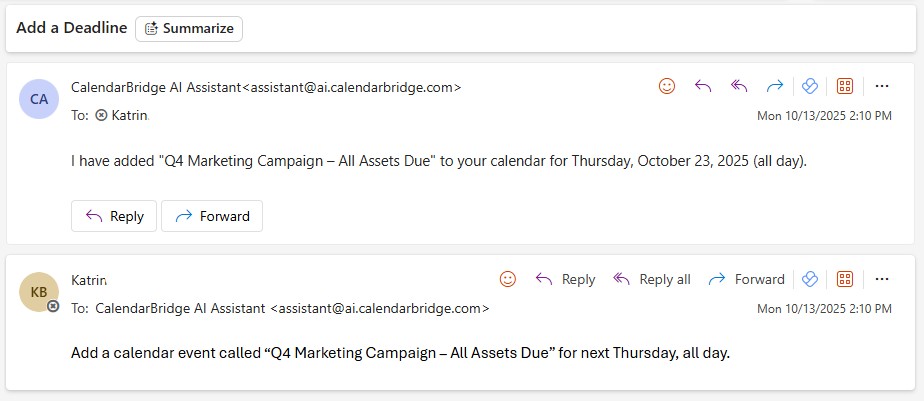
At the core of every AI meeting scheduler is Natural Language Processing (NLP). This allows software to understand real-world communication like an email saying "Can we meet next week?" and translate it into a structured calendar event..
NLP breaks language down into patterns, intent, and time references. It can distinguish between "next Tuesday" and "Tuesday next week" or "tomorrow at 9" and "9 tomorrow night." This might sound complex, but it makes scheduling as simple as typing a sentence or having a discussion like you would with a real person.
Predictive Scheduling is The AI’s Crystal Ball
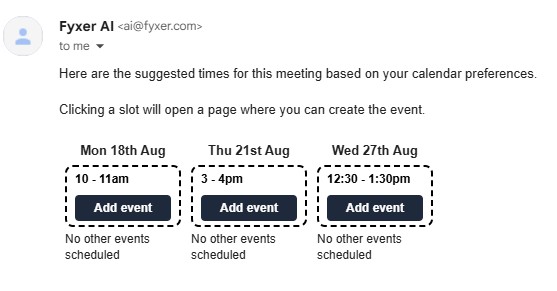
Modern AI schedulers analyze hundreds of data points, preferred meeting times, travel distance, buffer habits, and even historical response speed to suggest the best time, not just the next available one.
This predictive analysis creates schedules that feel human. The AI schedule assistant learns that you prefer afternoon strategy calls or that Fridays are meeting-free. Over time, it automates scheduling decisions with surprising accuracy.
AI Protects your Blocked Time
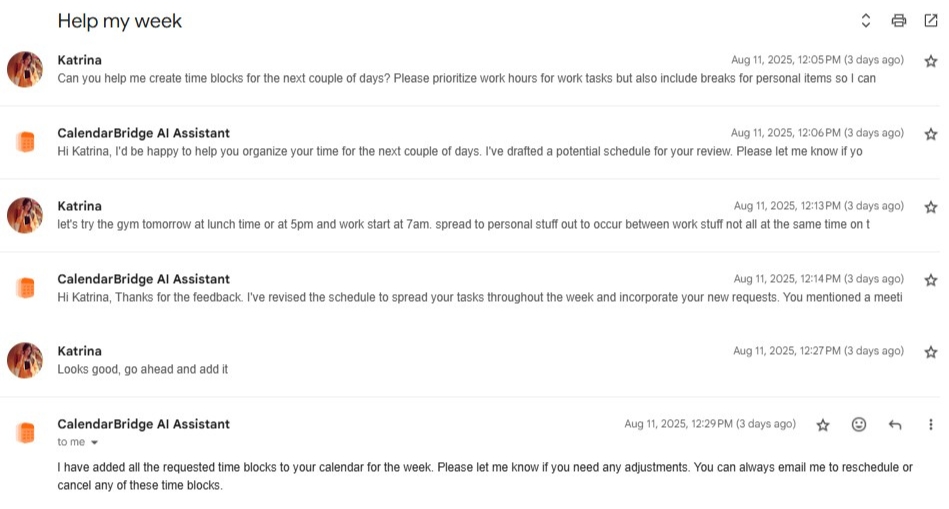
AI scheduling tools do more than book meetings; they defend your time. By automatically creating focus blocks, moving tasks, and rescheduling conflicts, these assistants protect deep work periods that typically get overrun by meetings.

Real-Time Conflict Resolution
The best AI schedulers like ours at CalendarBridge, integrate across Google, Outlook, and iCloud calendars, resolving conflicts the moment they arise. When one meeting shifts, the AI automatically updates dependent events or notifies participants to reschedule.
This level of automation eliminates errors and ensures every calendar reflects true availability in real time.
Why AI Scheduling is a Must-have Tool
Reclaiming Lost Time
Research shows that professionals spend hours each week coordinating meetings. With an AI meeting assistant, scheduling becomes nearly instant. The ROI is clear: less coordination, more focus.
Sharper Focus and Productivity
By removing manual coordination, workers free up valuable mental bandwidth. Instead of juggling calendars, they spend more time preparing for meetings or doing deep work.
Enhanced Professionalism and Client Experience
AI schedulers elevate client interactions. Branded booking pages, instant confirmations, and automated reminders create a polished, reliable impression that reflects well on your business.

Eliminates Time Zone Scheduling Errors
Global collaboration becomes effortless. AI scheduling assistants automatically adjust for time zones, ensuring everyone sees the correct local time.
Data-Driven Meeting Culture
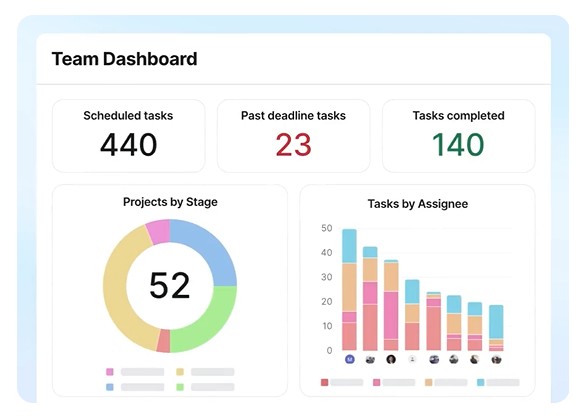
Many tools now include meeting analytics tracking duration, attendance, and cost per participant to help organizations evaluate and optimize how they meet.
Personalized Identity Awareness
In 2026, AI calendar assistants should recognize who you are without requiring any complicated setup. Users expect their assistant to automatically pull their name, role, and preferred display format directly from their primary calendar account. When the assistant speaks to you or drafts messages on your behalf, it should reflect your identity exactly as it appears in your calendar. This creates a natural, consistent communication style and removes the need to configure profiles or fill out extra fields.
7 Essential Features Your AI Scheduler Must Have
Choosing the right AI meeting scheduler starts with knowing what to look for. Here are the must-have capabilities for this year, and especially looking forward into 2026.
1. Real-time, Two-Way Calendar Sync & Integration
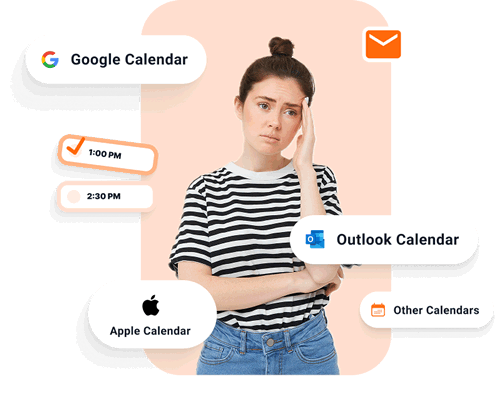
Your AI scheduler should fully sync across multiple calendars and platforms; work, personal, or shared, and Google, Outlook and Apple calendars, while also updating in real time. True calendar automation means the AI sees every commitment, no matter where it lives.
2. Advanced Group Scheduling
Forget manual polling for meeting availability. AI can dynamically compare multiple participants’ calendars and find the single best meeting time, saving you from the hassles of endless email chains or back & forth nonsense.

3. Dynamic Buffer Time
Back-to-back meetings cause burnout. AI inserts smart buffers like a 15-minute gap between calls so you have time to recharge and reset.
4. Meeting Type Routing
Instead of one generic booking link, AI scheduling assistants can route requests to the right team member or adjust meeting length based on purpose. A prospect booking a “Demo” might get routed to sales, while “Support” goes to service.
5. Automated Reminders and Follow-Ups
No-shows are costly. Look for an assistant that sends intelligent reminders and post-meeting follow-ups that collect materials or reschedule missed appointments automatically.

6. Customizable Booking Pages
Professional booking pages should be mobile-friendly and brand-aligned. Include your logo, description, and availability options to make the process feel seamless.
7. Security and Compliance
Enterprise adoption depends on privacy. Your scheduling software should use end-to-end encryption, comply with GDPR, and meet SOC 2 or ISO 27001 standards. CalendarBridge is the standard in shared calendar privacy!
Tailored AI Scheduling Workflows for Every Department
AI scheduling is not one-size-fits-all. Its strength lies in adaptability across different roles and industries, and the various ways it helps you save time.
Sales Teams and Lead Prospecting - Speed to Lead
Sales reps use AI to instantly schedule demos, pre-qualify leads, and auto-log meetings in their CRM. The result is shorter sales cycles and fewer missed opportunities. You can even connect your AI assistant to web forms to automate discover call booking.
HR Hiring Teams and Onboarding New Talent
HR teams can use AI to schedule interviews, coordinate onboarding across departments, and keep candidates moving through the hiring process without delays. The result is faster hiring cycles, better candidate experiences, and fewer scheduling gaps between recruiters, managers, and new hires. You can even connect an AI assistant to streamline interview scheduling and automate onboarding meeting coordination across your team, regardless of where they are.
Executive Assistants and Leaders
Leaders rely on AI for internal coordination, while executive assistants use it to manage high-volume requests. AI scheduling assistants can prioritize group meetings, protect focus hours, and even propose the best times for board reviews.
Project and Product Managers
PMs automate recurring stand-ups, sprint reviews, and cross-functional syncs with smart room booking and resource management.
Consultants and Service Providers
AI simplifies client scheduling, invoicing, and payment collection. It can send a booking link, confirm availability, and attach a payment request, all in one flow.
Educators and Students
From office hours to tutoring sessions, AI scheduling tools give educators simple, self-service booking pages that reduce administrative time.
The Road Ahead - AI Scheduling Trends and Innovations
The future of scheduling is proactive, generative, and emotionally aware. Here’s what’s next.
- Proactive Event Creation
Soon, AI will recognize scheduling intent in emails or chat messages and propose a meeting automatically, before you even open your calendar. - Generative AI for Meeting Preparation
AI will create agendas, draft discussion points, and even summarize relevant documents for each meeting, when connected to your shared document libraries. - Seamless Voice Command Integration
Imagine scheduling a complex, multi-person meeting by simply saying, “Set up a 30-minute strategy call with my design and marketing teams for next week.” AI will handle it instantly. - Emotional Intelligence in Scheduling
Advanced AIs will monitor meeting frequency, workload, and tone to suggest breaks or reschedules when burnout risk increases making time management more human.
Why CalendarBridge Is the Best Choice for AI Scheduling
CalendarBridge is built specifically for one thing, calendar management done right. It’s the core feature of our products. Unlike all-in-one productivity platforms that overload users with unnecessary AI features, CalendarBridge focuses entirely on scheduling accuracy, privacy, and reliability.
Its real-time sync across Google, Outlook, and iCloud ensures your availability is always current, while its AI assistant handles coordination without adding clutter, or the cost of a virtual scheduling assistant. The result is a streamlined scheduling experience that feels intelligent, fast, and effortless, without the complexity of tools trying to do too much.
Tame Your Calendars with the Best AI Calendar Assistant Available!
No credit card required
Frequently Asked Questions
AI meeting scheduling software automates the process of finding, booking, and managing meetings by using artificial intelligence to interpret language, check availability, and prevent scheduling conflicts across multiple calendars.
By understanding intent, working with your synced calendars, and automatically suggesting or booking times, AI scheduling assistants eliminate back-and-forth emails and handle follow-ups instantly, reclaiming hours each week.
Look for two-way real-time sync, group scheduling, smart buffers, branded booking pages, automated reminders, and strong privacy compliance like SOC 2 or GDPR.
Yes. The best tools, such as CalendarBridge, integrate across Google, Outlook, and iCloud calendars, ensuring full visibility and real-time updates without manual syncing.
Modern AI scheduling platforms include encryption, secure data handling, and compliance with industry standards like ISO 27001, making them safe for both personal and enterprise use.
AI meeting tools are evolving toward proactive and generative intelligence, creating agendas, summarizing prep materials, and detecting workload stress to recommend better scheduling patterns.
Conclusion: Embrace the Future of Scheduling Automation
AI assisted scheduling assistants have moved beyond convenience. They are now essential for efficiency, accuracy, and balance. The professionals who adopt them today are shaping the future of work, one meeting at a time.
If you’re ready to save time, reduce friction, and experience true calendar automation, try an AI meeting scheduler like ours at CalendarBridge. Its intelligent assistant syncs all your calendars, schedules directly from email, and keeps every meeting in perfect order.