Summary
To coordinate change management meetings across organizations at scale, use a repeatable scheduling process that keeps availability accurate across participants’ calendars and matches each meeting type to the right scheduling method.
The challenge grows when the same engagement activities must happen across business units, regions, and rollout waves. A change lead may be arranging manager briefings for one location, training for another, and a readiness review for a third. Several activities depend on the same leaders, trainers, and outside partners. A calendar conflict can consume the time reserved for answering questions or resolving concerns.
I have spent nearly three decades in consulting and technology transformation, including serving in change-management roles on large transformational programs, as well as program and release management. I have coordinated clients, consultants, vendors, executives, and global teams. For years, I also maintained separate client and consulting-firm calendars by manually copying busy blocks between them – a task that regularly took multiple hours on Sunday, with ongoing maintenance during the week.
CalendarBridge supports the calendar accuracy and meeting coordination behind that work; the change team supplies the priorities, engagement plan, and decisions.
What actually needs to scale: meeting volume or coordination?
The coordination process needs to scale. Adding more meeting invitations without a repeatable way to arrange them simply creates more work for coordinators.
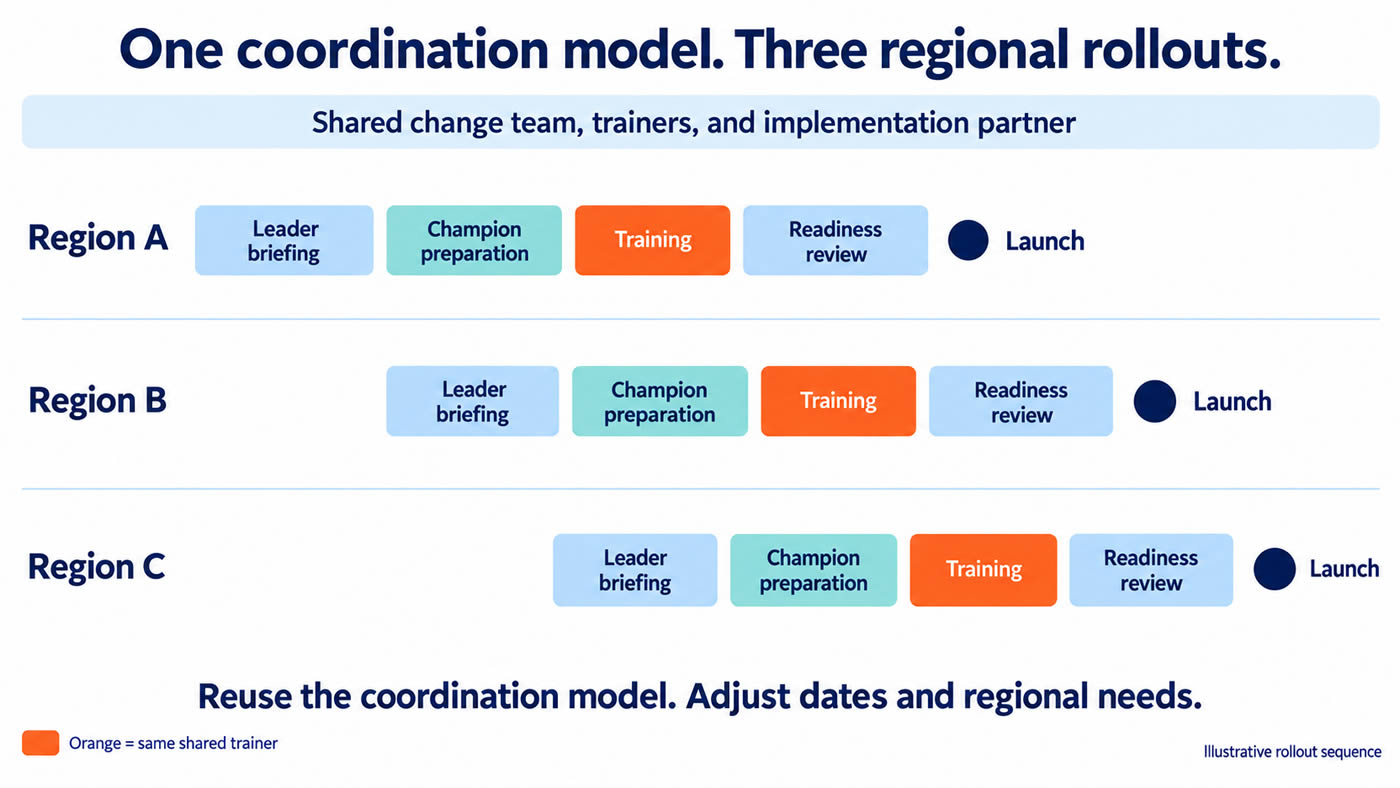
Consider an illustrative business-system rollout across three regions. Each region needs leader engagement, employee training, champion sessions, and a review of whether people are prepared to launch. The regions start at different times, but share a central change team and implementation partner.
The company uses Outlook. The partner uses Google Calendar, and some consultants have accounts in both environments. Most employees can see internal colleagues’ availability; the gaps appear around outside partners and people with multiple accounts.
If one region moves its training dates, the shared trainer’s other commitments now matter to the two other regions. A manager briefing must also move because employees need answers before registration opens. The coordinator is managing a chain of conversations, not isolated appointments.
For each wave, plan the conversations around the rollout milestone: brief leaders before employee communications, prepare champions before they support colleagues, complete training before readiness is assessed, and hold the review early enough to address gaps. If one activity moves, check which later conversations also need to change. CalendarBridge supports the availability and scheduling work within that sequence.
> Learn more about CalendarBridge scheduling tools for distributed teams.
How do you make availability reliable across organizations?
Make commitments appear as occupied time in the calendars people actually use to schedule one another.
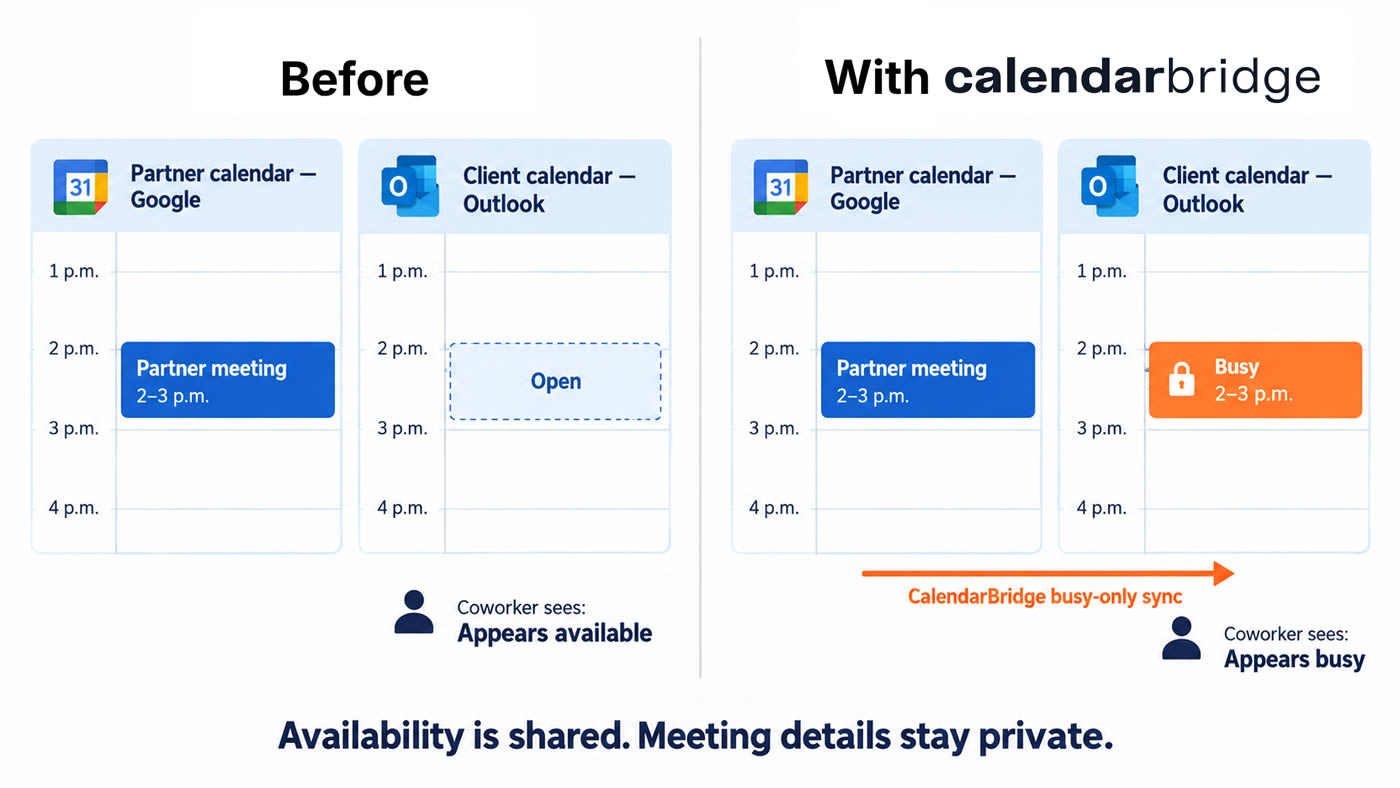
A consultant may see a client calendar and a consulting-firm calendar side by side, and know they have consulting-firm activities planned. Client colleagues may still see an open afternoon for the consultant, because their scheduling tools only check the client account. A combined view helps the consultant spot the conflict, but the information colleagues use remains incomplete.
Calendar synchronization, or sync, keeps connected calendars updated. CalendarBridge can copy a Google Calendar commitment into Outlook as a busy block and update that copy when the original meeting changes.
In our rollout example, a partner meeting from 2 to 3 p.m. can also block that hour on the change lead’s client calendar. A regional manager arranging a briefing can account for the commitment without seeing the partner’s calendar.
A consultant we interviewed described the everyday cost of disconnected calendars: meetings moved in separate client systems without him noticing, and colleagues reached out to ask whether he was joining an important meeting. For a change team, missing a meeting may also mean missing the concern that needs attention before the next wave.
To avoid this challenge, start with identifying people whose time crosses organizational boundaries. Connect approved calendars and choose the needed sync directions. Confirm that a meeting, a time change, and a cancellation are reflected as expected before relying on the setup across the program.
How do you choose the right scheduling method?
Use one scheduling model across the program, with different methods for different interactions. For each activity, decide whether participants can choose an appointment, whether specific people must attend together, and whether a decision or deadline limits the available window. Accurate availability supports all three methods.
This distinction keeps routine requests from consuming the same effort as a sponsor briefing. It also avoids sending a booking link when the recipient expects the change team to arrange the discussion.
Use a small set of approaches consistently:
- Individual support: publish available appointments for manager coaching or office hours.
- Small groups with known availability: offer a combined booking link when the required hosts have CalendarBridge schedulers.
- Meetings needing discussion: use email coordination, supported by the AI Scheduling Assistant where appropriate.
- Recurring engagement: establish a predictable schedule with clear rules for regional alternatives and exceptions.
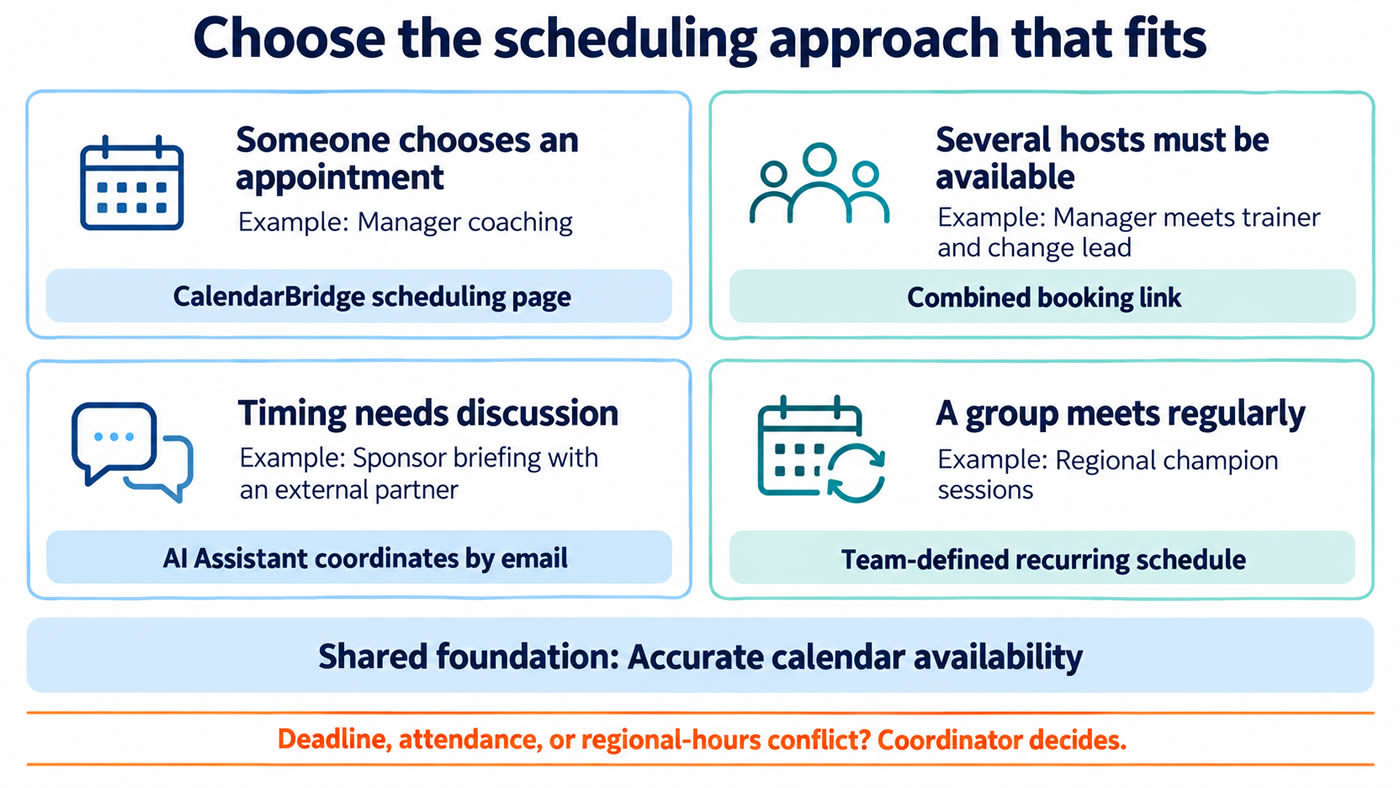
A recommended practice would be to define the times when a coordinator will need to step in, for example:
- no approved appointment works,
- required participants have no overlapping availability,
- a meeting cannot happen before its deadline,
- or the available time falls outside agreed regional hours.
The coordinator then decides whether to add a session, accept a delegate, escalate a conflict, or adjust the plan.
How does this work for training across several rollout waves?
Publish repeatable support appointments, but reserve shared trainers’ time before opening those appointments to participants.
Suppose the same trainer supports all three regions. Offering coaching times separately for each region can create competition for the same capacity. Decide when the trainer is available for each wave, including preparation time and other program commitments.
A CalendarBridge scheduling page can then let a manager choose an appointment from approved availability. It checks the calendars selected for that page and applies rules such as working hours and meeting length. Extra time between appointments – often called a buffer – gives the trainer room to prepare or finish follow-up notes.
If coaching requires both the trainer and change lead, a combined booking link can show their overlapping availability. CalendarBridge supports up to five hosts on a combined link, each with a configured scheduler and custom booking URL.
Group training still needs a registration process for places, attendance, and completion. CalendarBridge supports the calendar coordination around it rather than managing the learning records.
How do you coordinate leader engagement without endless email?
Give the scheduling work a clear owner and use the existing email conversation to arrange the meeting with an AI assistant.
Leader engagement often involves a small, specific group: an executive sponsor, regional manager, communications owner, and implementation partner. Their conversation may need to happen before employees receive an announcement. Asking each person to choose independently can leave the change lead comparing replies and chasing the last response.
A healthcare organization using CalendarBridge described meetings involving people from seven or eight organizations. Getting schedules to line up took substantial coordination. They wanted to bring an AI assistant into the email thread once participants agreed they needed to meet.
The same workflow can support a change program. Include CalendarBridge’s AI Scheduling Assistant in the conversation with a clear request: “Please arrange 30 minutes with Maria, James, and me before Wednesday afternoon. We need to discuss employee concerns before Thursday’s announcement.”
The assistant checks calendars it has permission to access, proposes times, follows up, and sends the invitation. External participants can reply by email without a CalendarBridge account or granting calendar access.
The change lead decides which participants are essential and how to handle a missed deadline. The AI assistant supports the scheduling exchanges after those decisions are made.
> Learn more about AI Scheduling for Transformational Teams.
How do you schedule readiness reviews so there is time to act?
Work backward from the launch decision, leaving room to resolve issues after the review.
A readiness review checks whether people and teams are prepared for the change. Its value depends on when it happens. A Thursday review before a Friday launch may identify incomplete training with almost no time to respond. When training large groups of people, it is highly likely that there will be some unplanned absences and make-up sessions required.
For each wave, identify when the evidence will be ready and how long the team needs to address likely gaps. Reserve the review within that window while the required leaders still have availability. Also identify an acceptable delegate or escalation path before a conflict occurs.
Research published in 2026, drawing on interviews with 23 change consultants, highlights how the timing of employee involvement can help or hinder alignment during change. For your rollout, leave room for employees to raise concerns while the team can still respond.
In release-management work, I learned to reserve possible follow-up checkpoints in advance. Canceling a meeting we did not need was often easier than gathering decision-makers at short notice. That is useful for change readiness too, especially when several regions share the same leaders.
CalendarBridge can support finding and coordinating time for those participants. The program team owns the readiness evidence, decision criteria, and response to problems. Treat the review as a point in the rollout sequence, with work before and after it.
> Learn more about how Program Managers reduce decision latency.
How do you keep champion sessions useful across regions?
Set a predictable rhythm that gives champions time to gather questions, support colleagues, and report what they learn.
Change champions are employees who help their colleagues understand and adopt the new way of working. Their sessions become harder to coordinate when rollout dates differ by region and the central team is supporting several waves at once.
Instead of rebuilding the schedule for every request, establish a regular session for each region and add milestone-specific discussions where needed. A pre-training session might prepare champions for likely questions; a later session might focus on what employees are struggling with.
A 2026 research article argues that meeting frequency and spacing deserve attention alongside agendas and facilitation. For a champion network, that means planning a useful rhythm of sessions, with time between them for champions to support colleagues and bring back questions.
Set acceptable meeting hours for each region across the program. Use regional alternatives for repeatable training and champion sessions; decide whether global sessions should rotate to distribute inconvenient hours. Meetings requiring specific leaders may need exceptions, but coordinators should follow an agreed policy rather than negotiate a new one each time.
CalendarBridge can help keep the central team’s cross-calendar commitments reflected in its availability. Scheduling pages can support individual champion office hours, while the AI Assistant can help coordinate additional discussions. The change team determines the recurring schedule and when an extra meeting is worth adding.
How do you protect privacy while coordinating across companies?
Share the availability needed for scheduling, with only the meeting details the organizations permit.
One change management consultant we interviewed worked in sensitive client environments. Clients needed to see when he was unavailable in their own calendar systems without learning about other clients’ meetings.
CalendarBridge’s busy-only sync can mark time as occupied without copying details such as the meeting title or description. In the rollout example, the client sees that its change lead is busy from 2 to 3 p.m., rather than seeing another client’s name or confidential meeting subject.
Before connecting accounts, agree on which calendars participate, which direction information flows, and what details can be shared under organizational policies. This is also relevant when acquired companies are still using separate calendar environments during a transformation. Coordination needs often arise before systems are consolidated.
How do you know the approach is working at scale?
Test it in one rollout wave, then reuse what reduces coordination work without weakening participation or timing.
For the next wave, create a short scheduling brief for each recurring activity: purpose, required participants, earliest useful date, latest acceptable date, scheduling method, and exception owner. Reuse the brief in later waves, updating the dates and regional requirements.
Track a few practical signals:
- Meetings rebooked because a commitment was missing from the calendar used to schedule them.
- Follow-ups needed to confirm required participants.
- Readiness reviews held early enough to address gaps.
- Scheduling exceptions that require the change lead’s judgment.
Fewer emails alone do not demonstrate employee readiness. They indicate whether the team is spending less effort arranging the conversations that support it.
As the approach expands, reuse the scheduling rules across waves and adjust for regional needs. CalendarBridge can help keep availability aligned and meetings coordinated; the change team stays focused on who needs to engage, what they need to understand, and when their input can still influence the success of the rollout.
No credit card required