Scheduling Automations to Reduce Calendar Admin Time
Reduce the Admin Work Behind Scheduling
Spend less time coordinating calendars, finding availability, and managing meeting changes. CalendarBridge automates repetitive scheduling tasks so employees and teams can focus on the work that actually needs their attention.
No Credit Card Required.

Executive Teams
Executive Assistants
Recruiting Teams
Client-Facing Teams
High-Meeting-Volume Teams
Scheduling Shouldn't Create More Work
The time spent coordinating schedules, keeping calendars updated, and managing meeting details adds up fast, especially across a team or organization.
Endless Back-and-Forth
Checking calendars, comparing schedules, proposing times, waiting for replies, then starting over when none of them work.
Manual Calendar Updates
Adding events across calendars, blocking off time elsewhere, and updating everything again when plans change.
Every Change Restarts the Work
Checking availability, following up, sending invites, rescheduling meetings, and keeping everyone in the loop.
- AI Assistant
Hand Off Meeting Coordination to AI
Use the AI Scheduling Assistant to handle meeting coordination through email. It can find times based on your availability, coordinate with attendees, send the invitation, follow up when someone doesn’t respond, and handle rescheduling or cancellations for you, cutting down the time spent managing each meeting from start to finish.
- Scheduling Pages
Let People Schedule Themselves
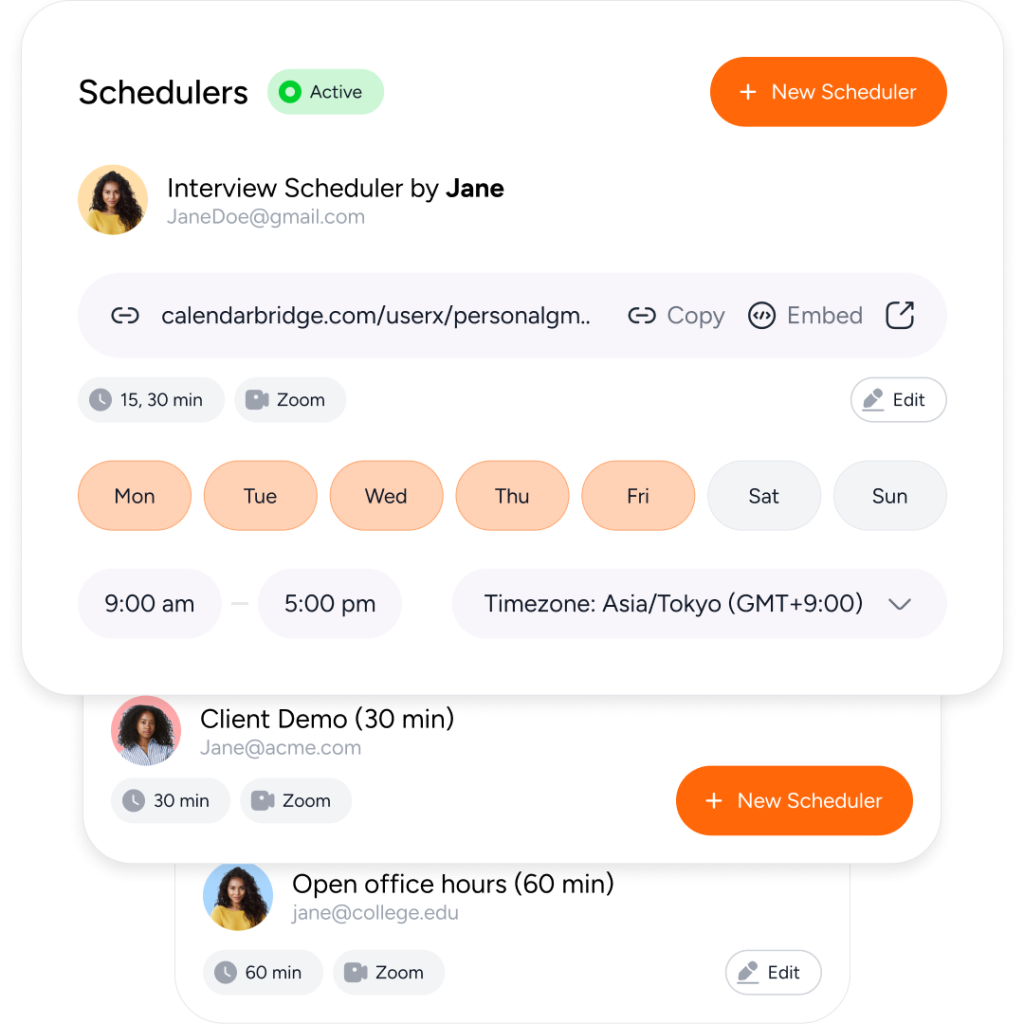
Eliminate manual coordination for meetings that don’t need a conversation to schedule. Create dedicated scheduling pages with your availability, meeting length, buffers, booking rules, and other preferences, then share a link so clients, coworkers, or anyone else can choose an available time and book directly.
- Unified Calendar
Manage Every Calendar From One Place
The Unified Calendar brings calendars across accounts and platforms into one view, so schedules can be viewed and managed without switching between separate calendars. Keeping everything in one place cuts out the extra steps, interruptions, and time that come with managing calendars separately.
- Calendar Sync
Keep Availability Updated Automatically
Calendar Sync keeps availability aligned across connected calendars, so employees don’t have to manually create and maintain busy blocks across separate accounts or calendar systems. For teams and organizations, syncs can also be managed centrally.
Built for Individuals, Teams, and Organizations
Executive & EA Scheduling
Reduce the time executives and assistants spend finding availability, following up with attendees, sending invitations, and rescheduling meetings.
- Group Scheduling
Recruiting & Interview Coordination
Keep interviews moving without manually coordinating candidates, hiring managers, and interview panels every time schedules change.
- Automate Scheduling
Teams Managing Multiple Calendars
Keep availability accurate across work accounts and calendar systems so employees spend less time checking calendars, copying events, and maintaining manual busy blocks.
Client & Customer Meetings
Make recurring client, sales, and customer scheduling easier by reducing the email back-and-forth required to find and confirm a time.
Privacy and Security Come First
With CalendarBridge, you stay in full control of your calendar and personal data.
We never store, analyze, or sell your calendar data to anyone.
We only request bare-minimum calendar permissions, never your email or files.
SOC 2® verified and Microsoft 365 GCC High compatible for ultimate compliance.

GDPR Compliant
Including DPA

SOC 2® (Type 1 & 2)
Verified, 2026

HIPAA Compliant
Since 2022

Trust Center
Available on Request
- Need Help or Have a Question?
Talk to Us
Need CalendarBridge for more than one person? Our team can help you understand the best setup for your organization, including multiple user licenses, account configuration, team deployment, security review questions, and the right way to structure calendar sync across your users.
Get Help Planning Your Team Setup
Tell us a little about your organization, the number of users you need to support, and any setup or security questions you have. A CalendarBridge team member will follow up to help you choose the right path forward.
By submitting this request, you agree that CalendarBridge may contact you about your request, and you agree to our Privacy Policy and Terms of Use.
How Teams Around the World Are Reducing Scheduling Admin

5.0

Everything is scheduled through my AI assistant. I use the same workflow I used with my human assistant: I forward the email, and it reaches out to schedule or reschedule the meeting

Austin
Executive / Founder
5.0
The biggest benefit is taking something that used to be a major time drain and simply not having to worry about it anymore. We use the AI assistant to help coordinate roughly 20 to 30 recruiting conversations in a typical week, along with internal meetings.
Madison
People & Talent Leader
5.0
The AI Scheduling Assistant reacts quickly, even on weekends when my assistant is not working.
Amara
Advisor & Business Owner
- Trust is Everything
We are Trusted by Major Companies Across All Industries
For enterprise-grade security and account management tools, companies turn to CalendarBridge.
- Get help
FAQs About Reducing Scheduling Admin Time
Quick answers to the most common questions. Need more help? Check out our help site.
CalendarBridge reduces scheduling admin by automating different parts of the process. The AI Scheduling Assistant can coordinate meetings through email, Scheduling Pages let people choose an available time themselves, Calendar Sync keeps availability aligned across connected calendars, and Unified Calendar lets you manage multiple calendars from one place.
Yes. The AI Scheduling Assistant can coordinate with meeting participants through email, check your availability, suggest times, follow up with attendees, send invitations, and help manage rescheduling or cancellations. This reduces the amount of manual email coordination required for each meeting.
Yes. CalendarBridge Scheduling Pages let you create booking links based on your availability and meeting preferences. You can set options such as meeting duration, buffers, and booking rules, then share the link so clients, coworkers, or other participants can select an available time and book directly.
CalendarBridge can keep availability aligned across connected calendars automatically. Instead of manually copying events or creating busy blocks in separate accounts, Calendar Sync updates the calendars that need to reflect your availability. The Unified Calendar also gives you one place to view and manage calendars across accounts and platforms.
Yes. CalendarBridge can reduce the manual work involved in checking executive availability, communicating with attendees, sending invitations, and handling meeting changes. Executive teams and assistants can use its scheduling, calendar-syncing, and multi-calendar management tools together depending on how they prefer to coordinate meetings.
Yes. CalendarBridge supports individuals as well as teams and organizations. Organizations can use calendar synchronization and scheduling tools across multiple employees, and calendar sync connections can be centrally managed for team deployments. This can reduce the amount of manual calendar maintenance required across the organization.
No. People you schedule with do not need a CalendarBridge account. They can interact with the AI Scheduling Assistant through email or use a Scheduling Page or booking link to select an available time.