Summary
Release managers can coordinate go-live meetings more reliably by identifying decision-makers early, reserving critical decision windows in advance, and making sure participants’ availability is accurate across every calendar they use.
CalendarBridge can help release managers coordinate meetings before, during, and after go-live by keeping availability accurate across separate calendars and reducing the back-and-forth required to get the right people together. The release manager still decides who needs to meet, when a decision has to happen, and what takes priority.
That job gets harder as go-live approaches. A major release can involve dozens of cross-functional teams, senior leaders, consultants, vendors, and client stakeholders. Some provide readiness information. Others resolve issues. A smaller group may ultimately decide whether the release can proceed.
Recent Atlassian research found that 87% of knowledge workers say they lack the time or capacity to coordinate when everyone is focused on execution. Release managers often feel that pressure during the moments when coordination matters most: readiness reviews, escalations, approvals, and go-live decisions.
Effective coordination helps ensure the right people and information are available when the release needs them, without adding meetings that do not serve a clear purpose.
What should a release manager plan before testing?
Identify the people you may need throughout the release, not just the people attending the first planning meeting.
Different stages require different people.
A testing lead may confirm that testing can begin. A security specialist may only be needed if a particular risk appears. A business leader may rarely attend project meetings but become essential when the team needs approval for a workaround or go-live.
Ask one practical question early:
When might we need this person to provide information, solve a problem, or make a decision?
That helps identify likely decision-makers and escalation contacts before schedules get crowded.
It also avoids discovering two days before an important decision that the executive who must approve it had no idea their attendance would be required.
When these key decision-makers work across different companies, CalendarBridge can help make sure an opening on one calendar is not hiding a commitment on another.
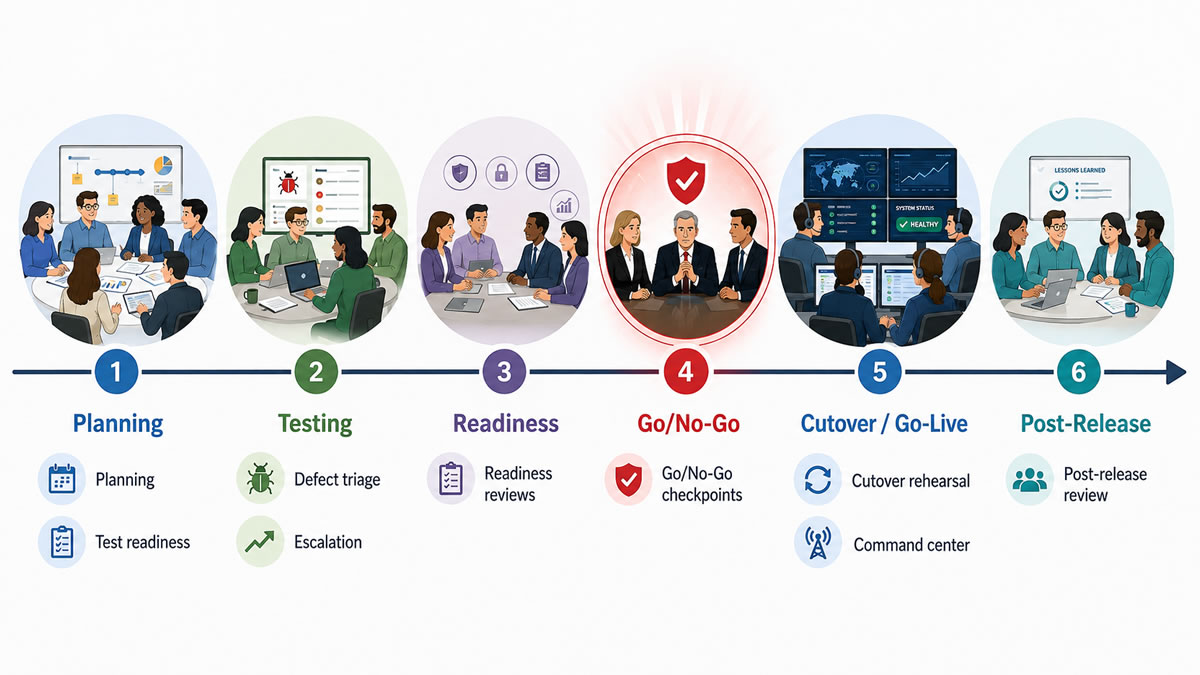
What is the purpose of a test-readiness meeting?
A test-readiness meeting answers one question: Are we ready to begin testing?
Teams may need to confirm that the build is ready, the test environment works, testers are available, dependencies have been addressed, and known issues are understood.
The meeting itself is usually straightforward. Finding the right time may not be.
The client testing lead might use Microsoft 365. The consulting team may work in another Microsoft environment. A software vendor might use Google Workspace.
Early in the release, that may feel like a minor inconvenience. As the number of meetings increases and timelines tighten, fragmented availability becomes much harder to work around.
Learn about our Cross-Tenant Scheduling Tools for Organizations
How should defect meetings work during testing?
Keep routine defect meetings focused. Bring additional people in when an issue requires a bigger decision.
A normal triage meeting needs people who can understand the defect, assess its severity, assign ownership, and determine the next action.
Senior leaders and specialist vendors probably do not need to attend every call.
Recurring meetings still have a purpose. A 2026 study of hybrid Agile teams found that regular Agile ceremonies can become important points of alignment for distributed teams. Recurring meetings can support alignment, especially for distributed teams, as long as each meeting has a clear purpose and includes the people needed for the discussion or decision.
Now imagine a major defect appears two days before go-live. The technical team has a workaround. The business owner must decide whether the workaround is acceptable, and the software vendor needs to confirm whether a permanent fix can arrive in time. The release manager suddenly needs a very specific group of people quickly.
This is where fragmented calendars become more than an inconvenience. A specialist may look free in the client calendar while already being booked in another company’s calendar; CalendarBridge can keep that busy time synced across connected calendars.
Knowing the likely escalation contacts before testing starts makes this process much easier.
How should go/no-go decisions be planned?
For a major release, schedule several likely go/no-go checkpoints in advance.
A go/no-go meeting is where the people accountable for the release decide whether it is safe and appropriate to proceed.
A smaller release may need one meeting. A major transformation may require several checkpoints.
An early review may identify readiness gaps. A later checkpoint may confirm whether those gaps have closed. The final go/no-go may authorize the production release.
The people voting on those decisions are often executives and other senior leaders whose calendars fill quickly.
Do not wait until the week before launch to find time. Reserve likely decision windows early and tell required voters why their attendance matters. If their approval is necessary for the release to proceed, they should know that the meeting is a release dependency, not another optional project update.
The go/no-go meeting is only the top of the process
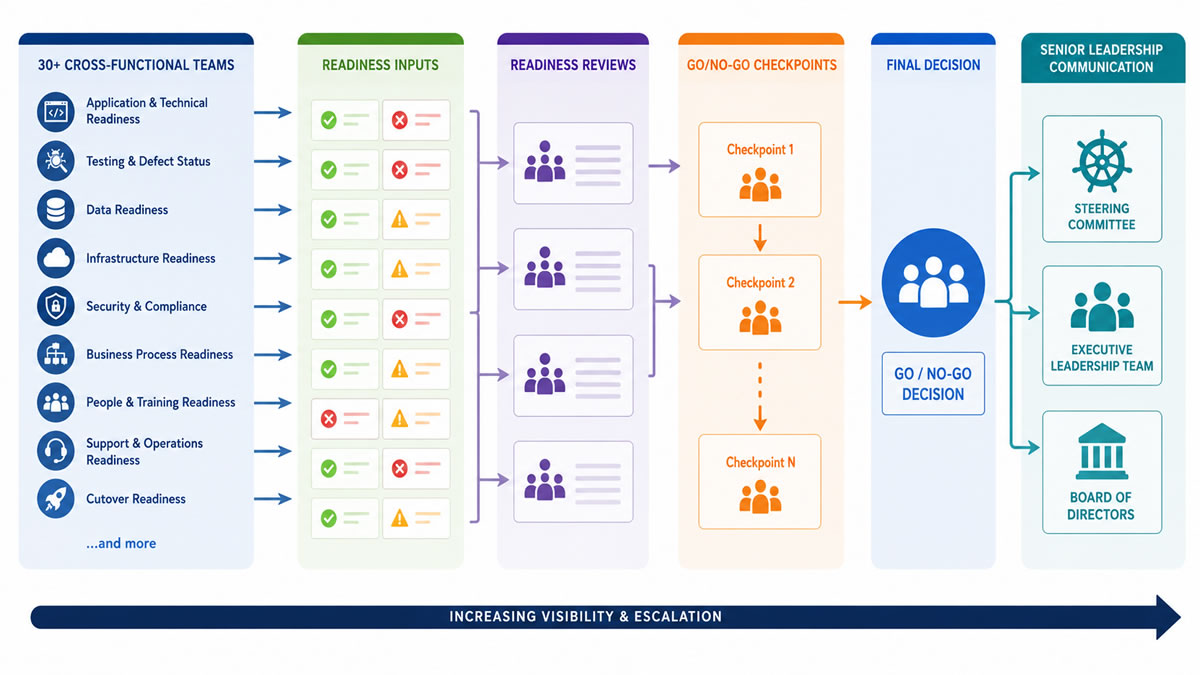
A large amount of cross-functional coordination has to happen before the final decision.
One release manager told us, “On some major releases I have managed, more than 30 teams reported readiness across different areas.”
Those areas included things like:
- Application and technical readiness
- Testing and defect status
- Data readiness
- Infrastructure readiness
- Security and compliance
- Business-process readiness
- People and training readiness
- Support and operations readiness
- Cutover readiness
Each team needs to determine its status, identify risks, resolve issues, and provide a recommendation. That creates a substantial meeting load: workstream reviews, readiness meetings, dependency discussions, escalations, and leadership reviews.
The release manager brings those inputs together so decision-makers understand the state of the release before they vote.
A go/no-go meeting should not be the first time an executive learns that an important readiness area is red.
Make sure the actual voters are available
The people attending need the authority or expertise to approve the release or accept its remaining risks.
An available project manager cannot necessarily substitute for a business leader who owns operational risk. Another engineer may not be able to speak for the technology leader accountable for production.
The challenge is that this small group is often made up of some of the busiest people in the organization.
Planning several checkpoints ahead of time gives the program a better chance of having the required voters available when decisions need to happen.
Plan the communication after the vote
A major go/no-go decision may need to be communicated to other senior audiences quickly.
Depending on the size and visibility of the release, that could include a steering committee, executive leadership team, or even the Board.
They may not need the detailed readiness discussion. They may need to know whether the release is proceeding, what significant risks remain, what changed since the last checkpoint, and what to expect during go-live.
For a major program, go/no-go is therefore not just one calendar invitation. It is a series of readiness meetings, escalations, executive decision points, and leadership communications compressed into a short period.
The number of meetings increases exactly when their stakes rise.
That is the part of release management CalendarBridge is built to help with: it does not make the senior leaders less busy, but it can make the availability behind those high-stakes meetings more reliable.
What should a cutover rehearsal accomplish?
Use the rehearsal to determine who needs to be available during the real deployment.
Walking through the technical steps is only part of the exercise. For each important cutover activity, determine who performs it, who confirms it succeeded, who makes the decision if it fails, and which specialists might be needed. Then decide whether those people need to remain on the command-center call or simply be reachable.
CalendarBridge does not replace that coverage plan. It helps the release manager trust that the people marked as available really are available across their connected work calendars.
This avoids two common problems: keeping 20 people on an eight-hour call because someone might need them, or discovering late at night that the one specialist you actually need cannot be reached.
The rehearsal should leave the release manager with a practical coverage plan.
Why can availability become a problem during go-live?
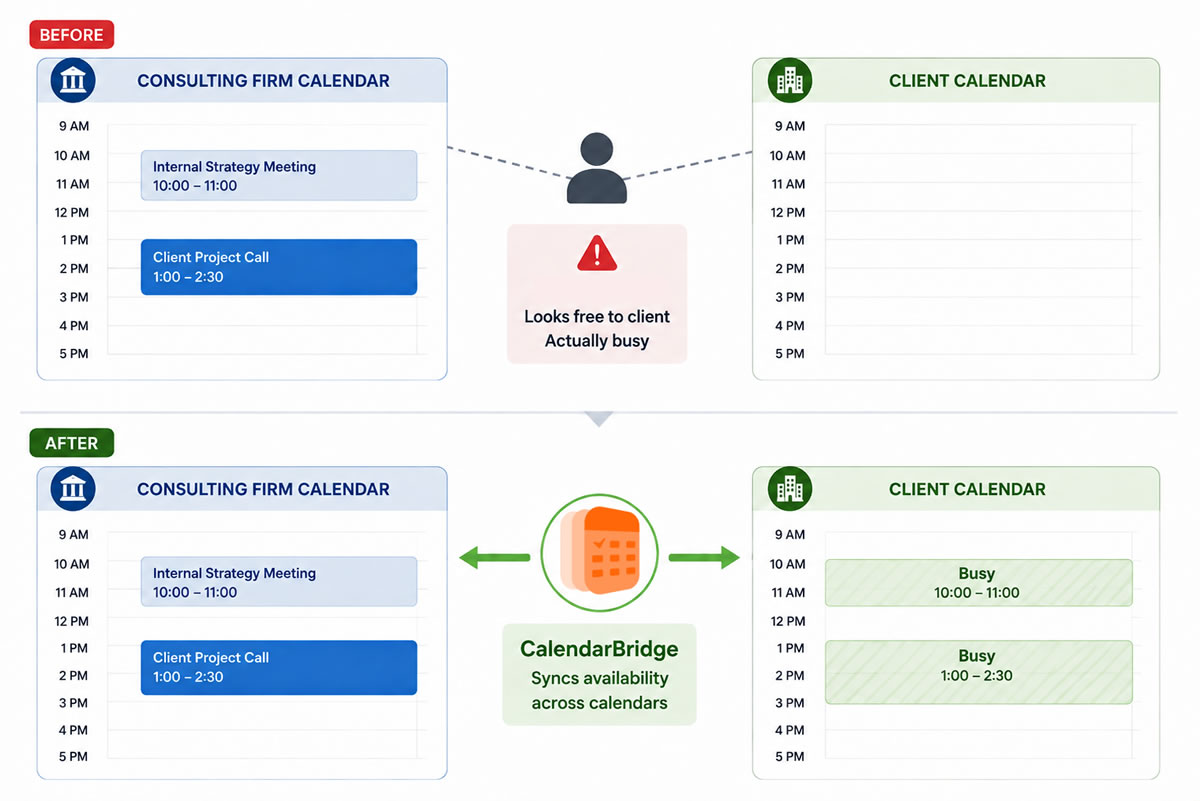
A person may look free in one calendar while already being booked in another.
Consider a consultant working on the release.
Their client calendar shows 2:00 p.m. open. Their consulting-firm calendar has another commitment from 1:30 to 3:00.
The client sees an open calendar. The consultant is not actually available. CalendarBridge customers deal with this problem in real life.
One embedded consultant we interviewed works across healthcare and aviation clients and may have three to five calendars at once. Each client needs to see when he is unavailable, but should not see confidential details from meetings with another client.
Another customer manages nine calendars for different clients. Before connecting them, she had to check the calendars individually before she could confidently tell someone when she was free.
The same problem can surface on a major release involving clients, consultants, systems integrators, and vendors.
A calendar can only show the commitments it knows about.
Why do separate companies make scheduling harder?
Each company normally sees its own calendar environment, not every commitment a person has elsewhere.
A consultant may have an employer calendar and another account provided by the client. The employer calendar knows about employer meetings. The client calendar knows about client meetings. Neither automatically has a complete view.
IT teams often call these separate company environments tenants. Whatever terminology an organization uses, the practical scheduling problem is the same: someone can appear available in one company’s calendar even though they already have a commitment in another.
People usually compensate by copying meetings, creating manual busy blocks, checking several calendars before accepting a meeting, or asking assistants to reconcile schedules.
One CalendarBridge customer worked across three businesses. Before connecting his calendars, assistants from those companies had to coordinate with each other just to understand when he was available. Once his calendars reflected his blocked time, that extra coordination largely disappeared.
What does CalendarBridge calendar syncing do?
CalendarBridge helps separate calendars reflect the same availability without requiring the accounts to be combined.
Suppose a consultant has a 10:00 a.m. meeting on their consulting-firm calendar. Without syncing, their client calendar may still show 10:00 as free. With CalendarBridge, the connected client calendar can also show that time as busy.
The consultant continues working in their normal calendar. The client does the same. CalendarBridge keeps the availability aligned between connected calendar environments.
For the release manager, the benefit is straightforward:
The availability being used to schedule an important meeting is more likely to be accurate.
Does calendar syncing expose private meeting details?
No. Someone can see that a person is unavailable without seeing why.
That matters when clients, consultants, vendors, or separate business units work together.
A client may need to know that a consultant cannot meet from 2:00 to 3:00. They do not need the name or details of the consultant’s confidential meeting with someone else.
CalendarBridge supports privacy controls that can show the time simply as busy.
That allows teams to improve scheduling accuracy without giving one organization broad visibility into another organization’s calendar details.
What if a whole program needs connected calendars?
Calendar connections can be managed centrally instead of asking every participant to maintain their own workaround.
Manual copying becomes less dependable as the number of people grows.
If 40 people are creating their own calendar blocks, the release manager cannot easily know whether all of those blocks are current. CalendarBridge Managed Syncs allows authorized administrators to centrally establish and manage calendar connections.
Users can keep working in Outlook or Google Calendar. Users can continue working in Outlook or Google Calendar while their availability stays current in the calendars they already use, rather than adding another calendar they have to monitor.
Where can AI scheduling help?
AI can handle some of the scheduling work after the release manager decides who needs to meet.
The release manager still determines which decisions matter most, who needs to be involved, and which commitments should take priority.
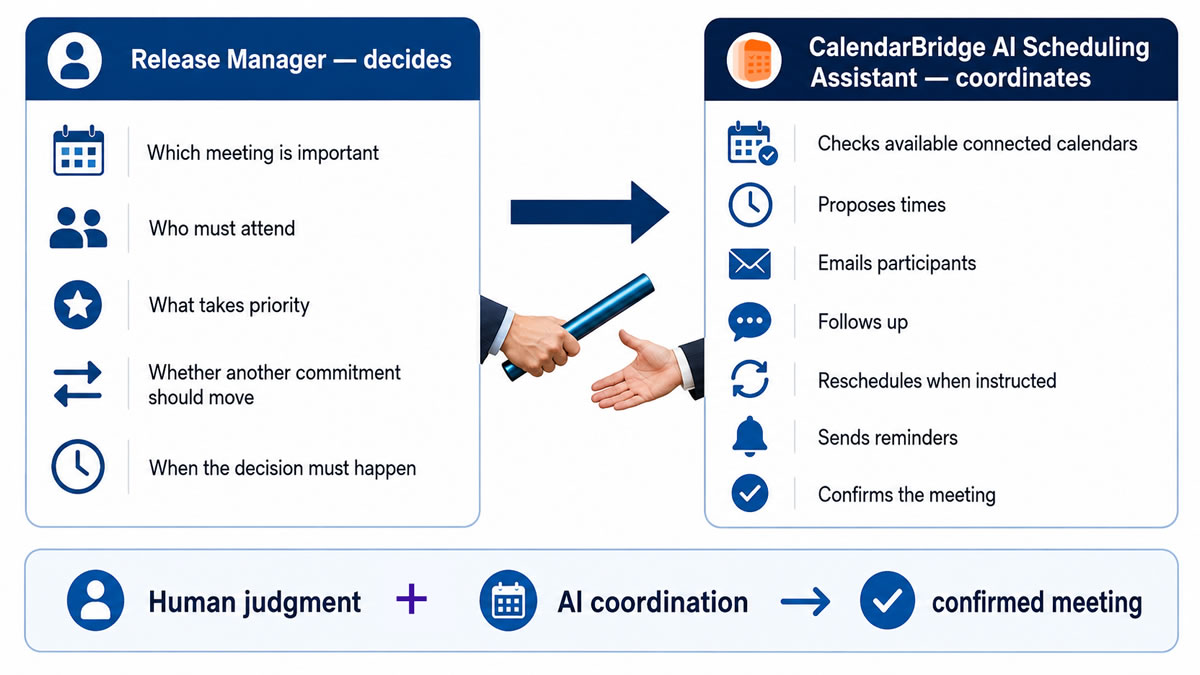
Suppose a senior leader is fully booked Thursday afternoon and an urgent go/no-go discussion has to happen. Someone still needs to decide which existing meeting can move, which commitment takes priority, or whether the go/no-go meeting itself should change. That requires judgment.
Microsoft’s 2026 Work Trend Index found that 86% of surveyed AI users treat AI output as a starting point and remain responsible for the thinking.
Once the decision has been made, CalendarBridge’s AI Scheduling Assistant can help propose times, schedule or reschedule meetings, establish recurring meetings, follow up with participants, send reminders, and help confirm attendance.
For a release manager, that might mean coordinating recurring defect triage, arranging a readiness review, or finding a new time for an escalation when a required participant becomes unavailable.
The release manager still runs the release. The AI reduces some of the administrative work around it.
What should happen after go-live?
Review coordination problems along with technical problems.
Once the release stabilizes, ask whether decisions were delayed because someone was difficult to reach and whether escalation contacts were identified early enough. Were important participants shown as available because another company or client calendar was invisible? If that happened repeatedly, fixing cross-calendar availability may be part of improving the next release.
Also look at meeting efficiency. Did specialists spend hours on command-center calls when they were needed for only 20 minutes? Did client, consultant, or vendor teams spend time manually reconciling calendars?
For phased deployments, those lessons can improve the next rollout immediately.
Plan the people as carefully as the tasks
Release managers already plan technical dependencies carefully. People can be dependencies too.
On a major release, dozens of teams may feed readiness information into a handful of high-stakes meetings attended by some of the busiest people in the organization.
As go-live gets closer, three questions matter:
- Who do we need?
- When do we need them?
- Are they actually available?
CalendarBridge does not make the release decisions. It helps keep availability aligned across separate calendars, allows organizations to manage those connections at scale, and can reduce some of the scheduling work around those decisions.
That gives the release manager more reliable availability and more time to focus on getting the release safely across the finish line.

Final Thoughts
PMOs can make transformation-team onboarding easier by defining the meetings each role needs, connecting the calendars that reflect participants’ real availability, and automating routine scheduling work.
CalendarBridge helps support that process with cross-calendar synchronization, privacy controls, AI-assisted scheduling, and booking pages, while the PMO retains control over priorities, dependencies, and exceptions.
