Summary
CalendarBridge’s Bring Your Own Agent (BYOA) lets you connect the AI agent you already use to the calendars and CalendarBridge tools you choose.
If you work in ChatGPT, Claude, Claude Code, Codex, Cursor, Manus, or another MCP-compatible AI tool, you can keep working there. Your agent can use the CalendarBridge capabilities you give it permission to access.
Why does that matter?
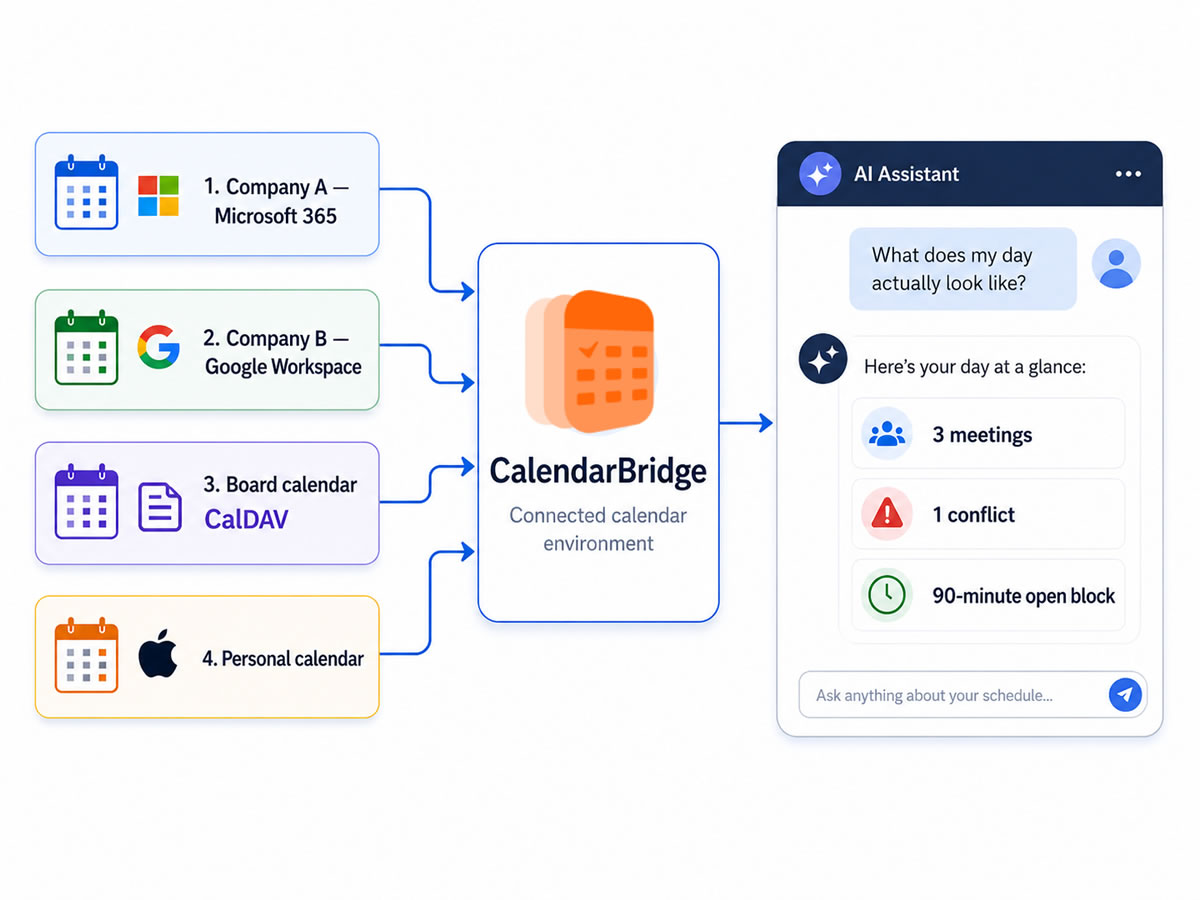
It’s 7:30 Monday morning. A fractional CFO advises three companies, sits on a Board, and keeps personal commitments on another calendar. One company uses Microsoft 365. Her own firm uses Google Workspace.
She opens her preferred AI agent and asks:
“Give me my schedule today, tell me where I have conflicts, and find me 90 uninterrupted minutes to finish the Board materials.”
That sounds like a simple AI request. But if the agent sees only one of her calendars, it may give her an answer that is perfectly reasonable – and wrong.
BYOA gives the AI interface she already uses a way to work with the broader calendar environment she has connected through CalendarBridge.
What problem does Bring Your Own Agent solve?
It gives your AI agent access to more of the calendars that actually make up your schedule.
Many people no longer have one work calendar.
Consultants receive accounts from clients. Fractional executives work across several companies. Board members may have separate organizational calendars. Entrepreneurs run multiple businesses. Personal commitments may sit somewhere else entirely.
One CalendarBridge customer manages nine email addresses, each with its own calendar because different clients give her accounts inside their organizations. Before CalendarBridge, when someone asked when she was free, she opened those calendars individually, wrote down possible times, and compared them.
She called it: “An impossible puzzle.”
CalendarBridge lets her connect those accounts and use tools such as calendar syncing, unified calendar views, schedulers, and AI-assisted scheduling. BYOA adds another way to work with them.
Her preferred AI agent can read events from the connected calendars it has permission to access, compare what is booked, and help identify open time. With the appropriate permission, it can also create calendar events.
The AI interface may be new. The problem – figuring out what is actually on all of your calendars – is not.
Why can’t my AI agent just use Google Calendar or Outlook?
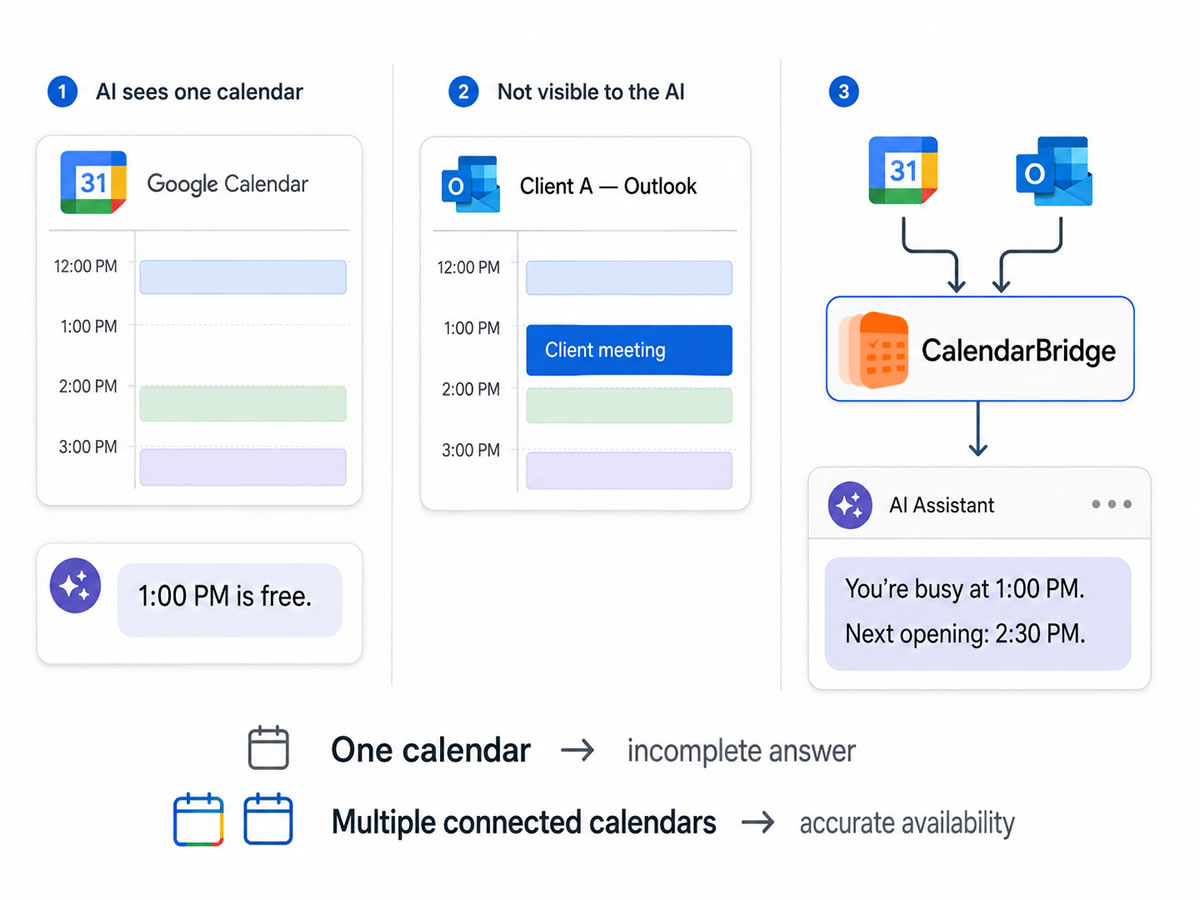
It can. But one calendar may show only part of your schedule.
Imagine that at 10:15 a.m., a client moves a consultant’s 2:00 meeting to 1:00 inside its Outlook environment. The consultant already has another client meeting at 1:30 on a separate calendar.
If he checks only one calendar, he may not realize he now has a conflict.
This happened regularly to one CalendarBridge customer we interviewed. He works across three to five calendars in separate client environments. Before CalendarBridge, meetings would move on calendars he wasn’t actively watching. People would Slack or call him asking: “Hey, you coming?”
With BYOA, instead of checking several calendars himself, he could ask his connected agent:
“Do I have any conflicts this afternoon?”
The agent can read the current events across the authorized calendars and surface the collision. It should not automatically decide that Client A matters more than Client B. The technology can identify the scheduling problem. The consultant still decides which commitment should move.
That distinction becomes important as AI takes on more work: better context can help the agent be useful without asking software to make business judgments it does not understand.
What can my AI agent actually do with CalendarBridge?
It can answer calendar questions and, with the right permissions, take calendar actions.
We tested this ourselves by connecting CalendarBridge to ChatGPT. Once authorized, ChatGPT could work directly with CalendarBridge tools instead of simply telling us what to do next. It could read calendars and events, create or change events, create booking pages, manage calendar syncs, work with connected calendar accounts, and send scheduling requests through a configured CalendarBridge AI Scheduling Assistant.
Go back to the event planner with nine calendars. At 11:00 a.m., she gets a request: “Can we get the moderator and four panelists together for a 30-minute prep call next week?”
Before CalendarBridge, answering that question meant checking her calendars individually and piecing together her availability first. With BYOA, she could tell her preferred agent: “Look across my connected calendars and find three 30-minute openings next week. Avoid Friday afternoon.”
The agent can compare events on the calendars it is allowed to read and identify possible openings. Then she has options. She could use those times herself. Or, with the right permissions, she could ask the agent to create a CalendarBridge scheduler so participants can choose from available times. For example, in ChatGPT, those tools include creating, editing, and deleting events; creating or changing schedulers; setting up one-way or two-way calendar syncs; checking connected accounts; and sending a request through a configured CalendarBridge Scheduling Assistant.
And if she wants someone to handle the actual email coordination instead of sending a booking page, she can use another CalendarBridge capability.
What if I want the meeting scheduled, not just a list of times?
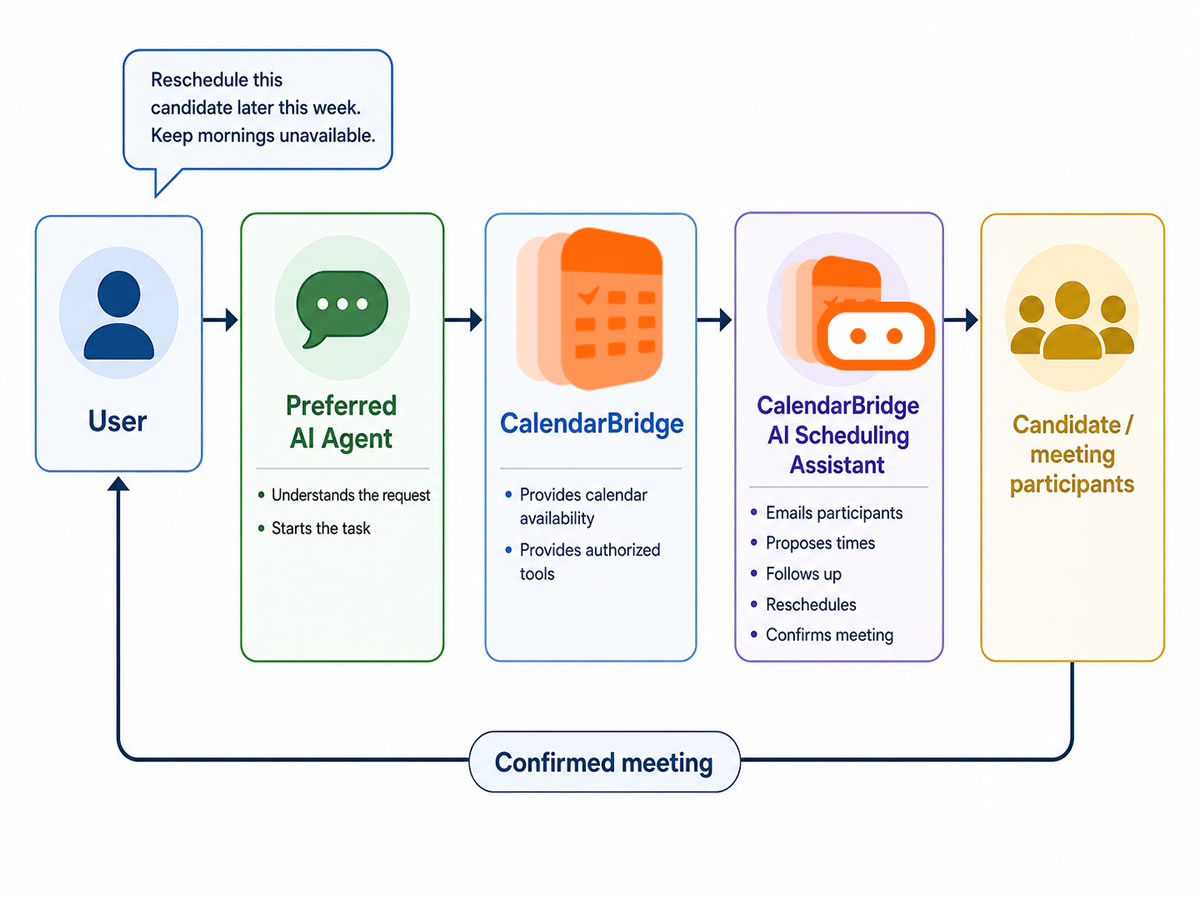
A connected agent can hand the email coordination to the CalendarBridge AI Scheduling Assistant.
Finding an open time and getting several people to agree to it are different jobs.
A scheduling conversation can involve proposing times, waiting for replies, following up, handling someone who cannot make the options, finding another time, and finally booking the meeting.
CalendarBridge has an AI Scheduling Assistant built for that work.
Consider another customer scenario. It’s 7:45 p.m. and a candidate emails a recruiter:
“I’m sorry, something came up tomorrow. Is there anything later this week?”
The recruiter is finished working for the day. One CalendarBridge customer handles roughly 20 to 30 recruiting conversations during busy weeks. She specifically valued having scheduling continue when candidates responded outside normal working hours.
With BYOA, she could start in her general-purpose AI agent:
“Ask my CalendarBridge assistant to reschedule this candidate later this week. Keep mornings unavailable and offer a few options.”
If she has configured the CalendarBridge Scheduling Assistant and given the outside agent permission to use it, the agent can initiate or continue that scheduling conversation. The CalendarBridge assistant then handles the participant-facing email coordination based on its configured availability and scheduling preferences.
The general-purpose agent does not need to wait around for the candidate to respond. The scheduling conversation continues asynchronously, like email normally does.
Why have one AI agent hand work to another?
Because one AI does not need to do every part of a job itself. We already work this way with people. An executive might tell an assistant:
“I need to meet with these three people next week.”
The executive knows why the meeting matters. The assistant handles the logistics. Agents can work similarly.
This pattern is also starting to appear in broader AI research. Microsoft’s 2026 Work Trend Index found that advanced AI users are increasingly using agents for multi-step work and experimenting with multiple agents, while becoming more deliberate about what should remain human work and what can be delegated.
Scheduling is a practical example. Your general-purpose agent can receive the request: “I need to meet with Sam next week.” CalendarBridge provides access to the appropriate calendar tools. If the task turns into an email conversation, the agent can hand that specialized work to the CalendarBridge AI Scheduling Assistant.
Researchers are studying this kind of specialization as well. A 2026 paper, Beyond the All-in-One Agent: Benchmarking Role-Specialized Multi-Agent Collaboration in Enterprise Workflows, examined workflows where agents have different roles and permissions. The researchers found that delegation and transferring context between agents remain difficult parts of multi-agent systems. That is one reason specialization is useful. The general-purpose AI does not need to recreate an entire scheduling system. It can hand a scheduling task to a tool designed for that job.
So what is MCP?
MCP is the standard connection that lets compatible AI agents use CalendarBridge.
The technical name is Model Context Protocol.
You do not need to understand how the protocol works internally to use BYOA, but the reason for it is straightforward.
Imagine a developer building a personal executive agent. It already handles email, tasks, and research. Now the developer wants to add calendar capabilities.
At first, that sounds simple: connect Google Calendar. Then Microsoft 365 enters the picture. Or iCloud. Then recurring meetings, cancellations, moved events, time zones, permissions, event ownership, and differences among calendar providers. CalendarBridge has already built infrastructure for dealing with those calendar problems.
MCP gives compatible AI applications a standard way to connect to tools like CalendarBridge instead of requiring a separate proprietary integration for every AI agent.
For the user, the practical idea is much simpler:
Keep the AI agent you prefer. Connect it to CalendarBridge.
What are people actually doing with CalendarBridge MCP?
They are already using it for more than asking what is on their calendar.
Within the first month after CalendarBridge opened its capabilities through MCP, users connected ChatGPT, Claude, Claude Code, Codex, Manus, and custom-built agents.
Some used agents for calendar briefings and availability checks. Others used conversational interfaces to create events, calendar syncs, and booking pages.
CalendarBridge even saw a custom calendar-monitoring agent connected without its creator ever contacting the company. There is an important distinction in that example.
CalendarBridge MCP provides access to calendar information and tools. It does not itself create a recurring monitoring schedule. If someone wants an agent to check calendars continuously or generate a Monday-morning briefing, the outside agent or automation system needs to support that recurring behavior.
CalendarBridge provides the calendar layer that agent works with. The resulting workflows can look very different:
A fractional executive: “What does my day actually look like?”
A consultant: “Do I have any conflicts this afternoon?”
An event planner: “Find a time without making me check nine calendars.”
A recruiter: “Have my scheduling assistant fix this interview.”
A developer: “Give my agent calendar capabilities without making me build all the integrations myself.”
BYOA does not require all of those people to adopt the same AI interface.
Does the agent get access to everything?
No. You decide what each connected agent is allowed to do.
That matters once an AI moves from answering questions to taking actions.
A July 2026 University of Washington review of AI-agent permission systems identified the same challenge across the emerging agent ecosystem: agents need enough access to be useful, while users still need understandable control over what those agents can do.
CalendarBridge separates different types of access. We saw this firsthand when we connected CalendarBridge to ChatGPT: before the connection was authorized, ChatGPT showed exactly which CalendarBridge capabilities it was requesting.
Reading calendar events, changing events, managing syncs, working with connected accounts, and sending messages through the AI Scheduling Assistant are presented as distinct types of access.
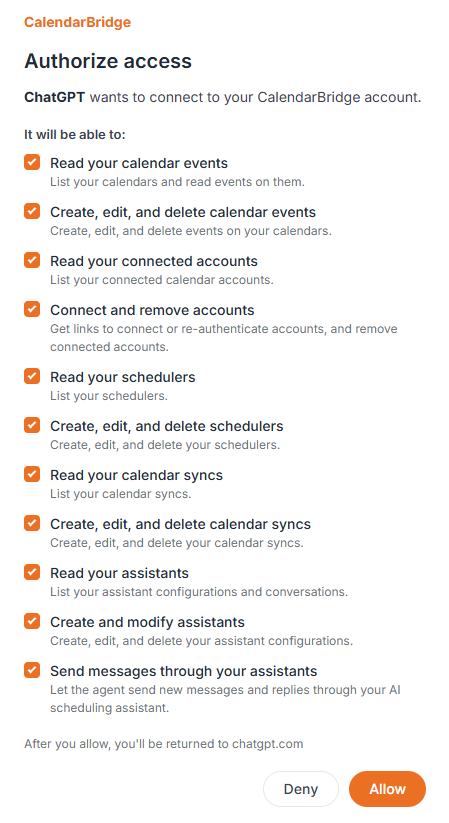
Reading calendar events is different from creating or changing them. Managing a calendar sync is different from creating a scheduler. Allowing an outside agent to use the CalendarBridge AI Scheduling Assistant is another permission.
Depending on the workflow, you can give an agent access to capabilities such as calendar events, schedulers, syncs, connected accounts, or the Scheduling Assistant. You can also connect different agents with different permissions and revoke access later.
Connecting an AI agent does not automatically mean giving it unrestricted control of your CalendarBridge account.
Final Thoughts: Does BYOA replace the CalendarBridge products I already use?
No. It gives you another way to work with them. CalendarBridge still has different tools for different calendar problems. Calendar syncs keep events or availability aligned between calendars. The Unified Calendar lets you view calendars together. Schedulers let other people book available time. The AI Scheduling Assistant handles meeting coordination.
Bring Your Own Agent lets a compatible outside agent use the CalendarBridge capabilities you authorize.
So if ChatGPT, Claude, Cursor, Codex, Manus, or another AI agent has become the place where you start your work, calendar tasks do not have to become an exception.
You choose the AI interface. CalendarBridge provides the calendar infrastructure behind it.
Keep your agent. Add CalendarBridge.
