Overview
Managing your calendar used to mean manually organizing time blocks, meetings, tasks, and habits. AI scheduling tools promised to change all that. While some, like Reclaim.ai, are well known, they often have serious limitations and drawbacks. If you’re looking for a better solution, read our guide to the best AI Assistant for popular calendar platforms.
In this guide, we’ll explore what Reclaim is, how it works, where users find fault with it, how to disable it, and why CalendarBridge is a stronger alternative for truly intelligent calendar management. If you’re a Reclaim user looking for an alternative, this article is for you!
Explore other AI scheduling articles to learn how different tools handle time management, automation, and collaboration across calendar platforms. Google has also released it’s own tool for automating scheduling, learn more about Help Me Schedule.
What Is Google AI Planner by Reclaim?
Reclaim ai is an AI-powered assistant that layers on top of your Google calendar. It doesn’t replace your calendar app, but connects to it to auto-schedule tasks, habits, meetings, and buffer time.
In its own description, Reclaim claims it can “get back up to 40% of your workweek” by defending focus time, auto-rescheduling conflicts, and inserting routines, breaks, and buffers.
Here are its key features:
Focus Time / Defended Time
You define blocks of time for deep work, and Reclaim tries to keep them free of overlapping meetings.

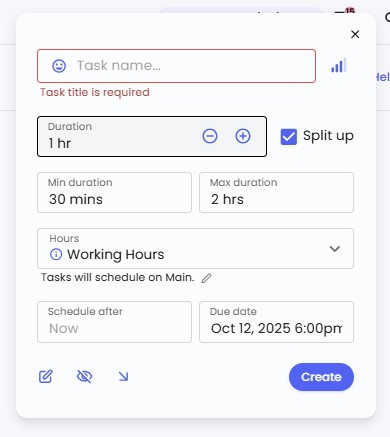
Tasks scheduling
You can tell Reclaim when tasks are due and how long they take; it will slot them in around other events.
Habits / recurring routines
Reclaim supports recurring commitments like workouts or commute time, placing them flexibly in your week.

Smart Meetings / Scheduling links
You can share availability links for others to book meetings, and Reclaim helps pick optimal slots across multiple calendars.

Buffer / break scheduling
It automatically inserts buffer times after meetings or between tasks to avoid back-to-backs.

Calendar sync and multi-calendar blocking
Reclaim’s calendar sync lets you connect multiple calendars so that events from one appear as “busy” time on another. This feature is designed to prevent double bookings between work and personal calendars. You can link Google calendars or connect a Google calendar with an Outlook account, and you can choose which calendar sends availability data to the other.
Reclaim’s sync creates simple availability blocks rather than full event copies. These blocks do not include titles, notes, or participants, and they are intended only to show when you are busy. The sync runs on a schedule, so updates are not instant, and it only works in one direction at a time. To mirror both calendars, you must set up two separate syncs.
While it’s useful for managing basic availability across Google and Outlook, it does not merge calendars, support iCloud, or provide real-time synchronization.

Analytics / time tracking
Provides reports on how your time is spent (meetings, tasks, habits) and how much “focus time” you get.

In short, Reclaim tries to act as an “AI layer” on your calendar, dynamically optimizing when and how things are scheduled.
AI Planner Limitations and User Feedback
Reclaim’s goal is to help people spend less time planning and more time doing. While that works well for some, real-world use shows that its automation can create friction in day-to-day scheduling. The reviews in Google Workspace are a clear example of the pain points and challenges many users face.
Common Limitations Reported by Users
- Sync delays
Reclaim’s updates don’t always appear instantly across connected calendars. This can cause your availability to display incorrectly, showing you as busy after you’ve freed up time, or free when a task has already filled that slot. For teams depending on shared calendars, these mismatches can lead to missed opportunities or double bookings. - Limited compatibility with other platforms
Professionals who use both Outlook and Google often find that Reclaim only protects one side. For example, blocking time in Google might not appear on their work calendar, causing double bookings. - No dedicated mobile app
Because Reclaim runs primarily in a browser, making quick edits between meetings or during commutes isn’t convenient. Users have to return to their desktop to adjust priorities or resolve conflicts. - Basic task management
Reclaim helps reserve time to complete tasks, but it doesn’t support more advanced needs like scheduling dependent tasks or visualizing progress on multi-step projects. - Paid tiers for core functionality
Features such as syncing multiple calendars or expanding scheduling rules require upgrading to a paid plan. - Reduced sense of control
Some users find that the automatic rescheduling of events happens without enough context. For instance, a focus block may move to make room for a new meeting, but the user doesn’t always notice until after it’s changed.
The Takeaway
Reclaim simplifies scheduling for straightforward routines, but for users managing multiple calendars or complex workflows, the automation can sometimes get in the way.
The most consistent feedback is a desire for smoother syncing, clearer visibility, and easier ways to make quick adjustments when plans change. It’s a smart system, but it often feels like it’s missing something between making things easier and keeping you aware of what’s happening on your own schedule.
How to Remove or Disable Reclaim
If you decide to stop using Reclaim, you’ll need to disable its features and remove access in a few places. There isn’t a single button that turns everything off at once, but the process is straightforward when you follow these steps.
Note: If Reclaim was set up by your organization, you may need help from your IT administrator to remove it or revoke permissions at the domain level.
1. Turn off calendar syncs
Go to Calendar Sync inside Reclaim, find each active sync, and either toggle it off or delete it. Turning off a sync stops new updates and removes any “busy” placeholders that Reclaim created on your other calendars.

2. Disable tasks, habits, and scheduling features
Open each section in your Reclaim dashboard and disable or delete what you no longer want active. That includes Habits, Focus Time, Smart Meetings, and Tasks. Disabling or deleting them will remove future events from your calendar.

3. Revoke calendar access in your account settings
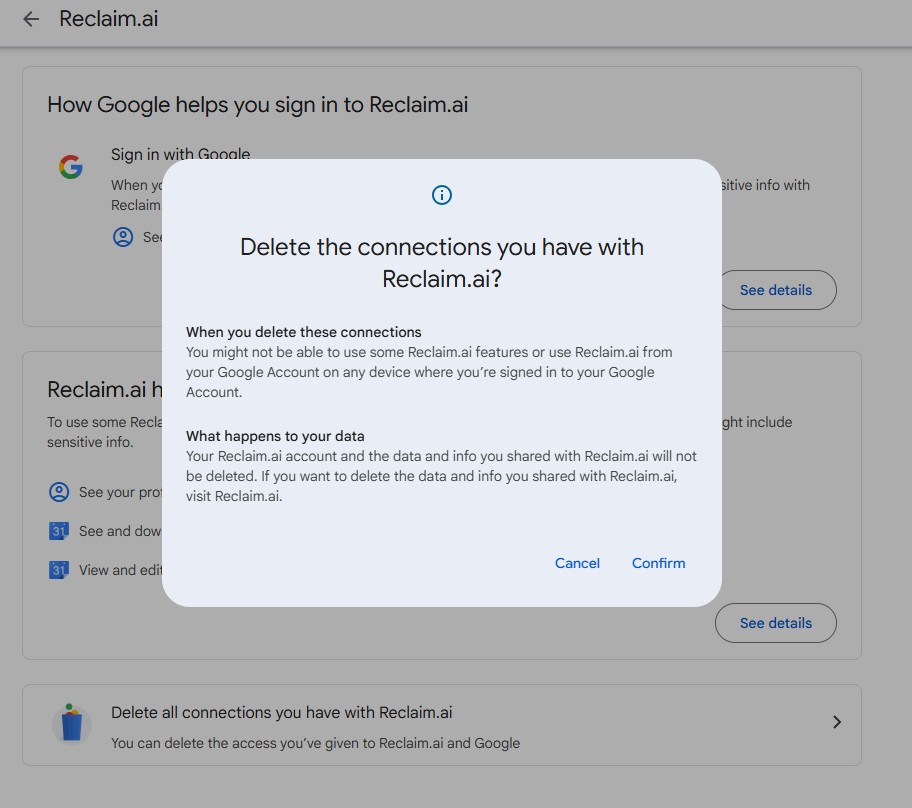
In your Google account, open the security or permissions page and remove Reclaim’s access. This stops it from reading or writing to your calendars going forward.
4. Delete or deactivate scheduling links
If you’ve shared public scheduling links or pages through Reclaim, disable or delete them to prevent anyone from booking new meetings.
5. Clean up your calendars
After turning off features, check your calendars for any leftover “busy” blocks or placeholder events. Remove these manually if they don’t disappear automatically.
6. Delete your account (optional)
If you want to fully remove your data from Reclaim, go to your Account Settings and select Delete Account. This will permanently remove all syncs, settings, and stored data.

Why CalendarBridge Is the Better Choice for AI Scheduling
Reclaim tries to take over your calendar. CalendarBridge works alongside it. It enhances the tools you already use instead of replacing them. You can keep working inside your normal Google or Outlook calendar, and CalendarBridge will keep everything in sync and accurate in the background.
At the same time, CalendarBridge offers more flexibility. It includes a unified calendar view, dashboard, and mobile app that let you see all of your calendars together if you want a single overview. These tools are optional and designed for convenience, not as a requirement to change how you plan or schedule.
The AI meeting scheduler also works where you already communicate, inside your inbox. It manages coordination directly through email, suggesting times, confirming meetings, and sending scheduling updates and automated reminders, all while keeping you in control.
How CalendarBridge and our AI Scheduler Works
Real multi-calendar syncing across Outlook, Google, and iCloud
CalendarBridge gives you full control over how your calendars connect. You decide which calendars sync, what direction information flows, and what details are shared. Once your syncs are set up, CalendarBridge keeps them updated automatically. When an event changes on one calendar, it updates on the others according to your chosen settings. This prevents double bookings and keeps your availability accurate across work, personal, and mobile calendars.

AI scheduling that actually does the work
CalendarBridge’s AI Scheduling Assistant manages coordination directly through email. You can set its default behavior in your configuration, or you can guide it case by case by copying it on an email or writing a quick instruction in the message. Once included in a thread, it reviews your connected calendars, finds available times, proposes options, confirms the best choice, and sends the final meeting invite. You stay focused while the assistant handles the coordination.
Built-in reminders and follow-ups
You can choose to have the assistant send reminders or confirmations automatically, or you can request them in a specific email thread when needed. Once configured, it follows your preferences and keeps attendees updated before each meeting, which helps reduce no-shows and last-minute cancellations.
Smarter workflow integrations
You can forward pictures, screenshots or links directly to the assistant to instantly create calendar events. It can recognize context and details from visual or written content, turning them into accurate event entries.

Designed for efficiency and control
CalendarBridge streamlines scheduling without removing transparency. Every feature is built to help users with multiple calendars, hybrid work setups, and shared responsibilities stay coordinated in less time and with fewer errors. CalendarBridge provides a stronger foundation for AI-assisted scheduling. Balancing automation with awareness so your calendar always feels like it’s working with you, not ahead of you.
Discover a Better AI Planner with CalendarBridge!

Frequently Asked Questions
Reclaim.ai is an AI assistant that connects to your Google Calendar to auto-schedule tasks, habits, and meetings. It helps reserve focus time and automate routines, but its sync features are limited to Google and partial Outlook integration.
Many users experience sync delays, lack of iCloud support, and limited control over automatic rescheduling. Professionals managing multiple calendars often find it unreliable for complex scheduling needs.
You’ll need to turn off all calendar syncs in Reclaim, disable tasks and habits, revoke its Google account access, and manually clean up leftover “busy” blocks. Full instructions are outlined in the article.
CalendarBridge provides real-time, two-way syncing between Google, Outlook, and iCloud with full control over visibility and direction. Its AI scheduling assistant works via email, making coordination seamless and transparent.
No. CalendarBridge works with your existing calendars. You can stay inside Google or Outlook while CalendarBridge keeps everything in sync behind the scenes.
Conclusion
AI scheduling tools like Reclaim are a great start, but they often leave users craving more control, transparency, and compatibility. That’s where CalendarBridge stands out. It delivers real-time sync across platforms, handles scheduling directly through your inbox, and balances automation with awareness. Instead of replacing your calendar, it empowers it, so every meeting, task, and routine stays connected and accurate wherever you work.