Introduction & Quick Summary
In high-value sales conversations, the scheduling experience matters more than most teams realize. I learned this the hard way when I was asked to set up a demo with HubSpot. This was not a casual signup or a quick discovery call, it was a multi-user sales evaluation involving multiple teams, decision-makers, and internal conversations.
In that kind of situation, I expected a little guidance. Instead, I got a booking link.
That experience stuck with me because it exposed something I already believed about sales. When someone is seriously considering your product, the goal should be to make the next step feel easy, personal, and guided. A booking link can be useful, but it can also make an important sales conversation feel like self-service checkout.
That is the problem CalendarBridge’s AI Scheduling Assistant is designed to solve.
Quick Summary
- Booking links work well for self-service scheduling but can feel transactional in high-value sales conversations.
- Manual scheduling creates hidden administrative work for sales teams.
- Important sales conversations often require a more guided, white-glove experience.
- CalendarBridge’s AI Scheduling Assistant helps sales teams coordinate meetings directly inside email threads.
- The assistant can suggest times, follow up, reschedule meetings, and book events automatically.
- Sales teams can keep scheduling personal without manually managing every conversation.
Why booking links fall short in enterprise sales
Tools like Calendly and others with booking pages built into calendar platforms are excellent for quick, self-service scheduling. For low-stakes meetings, support calls, or internal check-ins, speed and convenience are usually the priority.
The biggest problem, is when every conversation gets treated the same, and booking links become your go-to method for all scheduling.
When the conversation involves a major account, executive stakeholder, partnership discussion, or high-value client relationship, sending a booking link may be efficient, but it can also shift the work back to the prospective buyer.
My experience with HubSpot reinforced something I already instinctively knew in sales. In the hierarchy of things, the customer should not have to work to buy from us. The goal should be to make it as easy as possible for someone to say yes to spending time with you and ultimately buying what you are selling.
With high-value clients, this is the moment you lean in to the conversation. A booking link does the opposite.
The Hidden Cost of Manual Sales Scheduling
As an experienced salesperson, I understand this instinctively and it’s why I avoid booking links entirely for important conversations. Instead, I offer times directly and keep the scheduling process personal.
But the hidden cost is that manual scheduling starts following you everywhere, including outside working hours. You are constantly watching notifications, trying to keep momentum moving, and hoping to lock meetings in before you have to compromise on timing or other opportunities.
And when you are doing this across demos, follow-ups, and reschedules every week, the time adds up fast. Salesforce found sales reps spend only about 28% of their week actually selling. The rest easily gets consumed by coordination and administrative work.
How We Approach Scheduling Differently at CalendarBridge
With the CalendarBridge AI Scheduling Assistant, the experience is more like working with a real executive assistant.
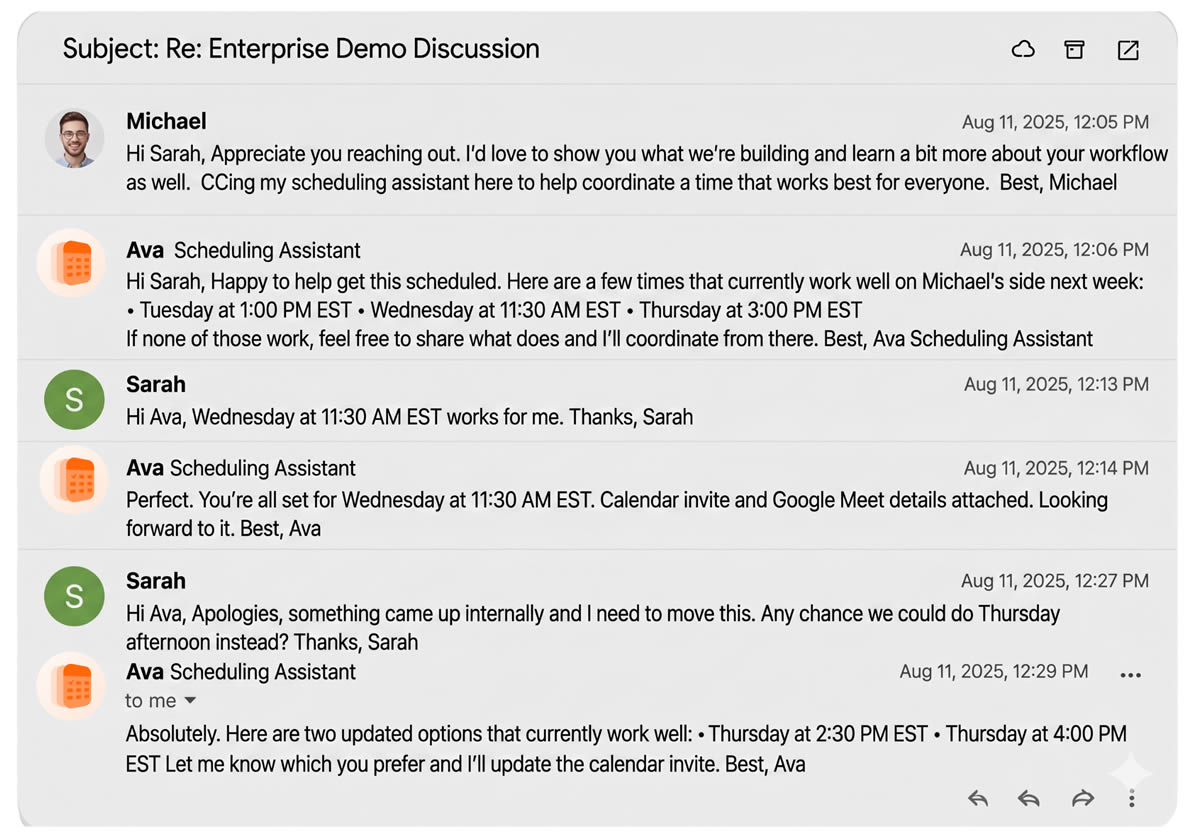
Instead of sending clients to your booking page, scheduling stays inside the email conversation. I can simply start the conversation normally and CC the assistant on the thread.
From there, the assistant can:
- Suggest meeting times or request availability
- Coordinate across all of your connected calendars, even across different companies, tenants, and environments
- Follow up if someone goes quiet
- Reschedule meetings when plans change
- Book the meeting and send calendar invites automatically
That becomes especially valuable in real B2B sales workflows where scheduling often spans multiple organizations, executives, departments, and calendar systems simultaneously.
How I Use Our AI Assistant for Sales Scheduling
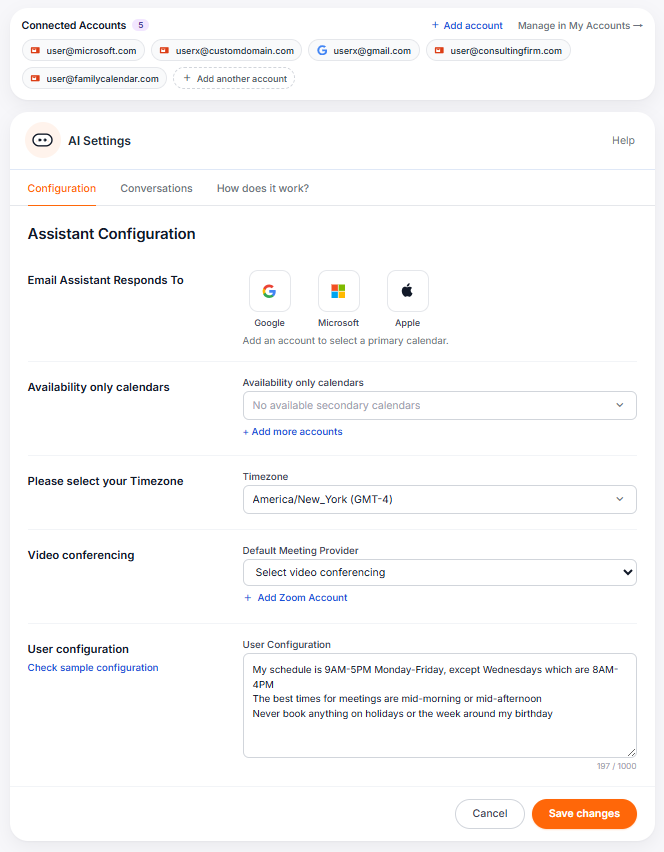
To use the our AI Scheduling Assistant for sales meetings, I would configure it around the way I actually want prospects to experience the scheduling process.
To use the AI Scheduling Assistant for sales meetings, I would configure it around the way I actually want prospects to experience the scheduling process.
First, I choose the email account the assistant should use. This matters because I want the scheduling reply to feel connected to the same professional identity the prospect already knows.
Next, I choose the calendars the assistant should check for availability. For many salespeople, consultants, executives, and founders, real availability is spread across more than one calendar. CalendarBridge can check connected calendars across different work, personal, client, or cross-company environments, which helps prevent conflicts that a single-calendar booking page might miss.
Then, I set my time zone and connect the video conferencing tool I use most often, such as Zoom, Microsoft Teams, or Google Meet.
The most important step is the assistant configuration. This is where I tell CalendarBridge how I want the assistant to behave when scheduling sales meetings.
Learn about customizing your AI Assistant in an Organization with many users.
How I configure my own AI Assistant for higher-value conversations
This is where the assistant becomes more useful than a basic scheduling tool. I do not want it to simply find any open time. I want it to protect the experience, preserve momentum, and know when to ask me before making a decision.
My configuration would look something like this:
– Keep the tone warm, professional, and conversational so the scheduling process feels personal instead of automated.
– Suggest 2-3 curated meeting times instead of exposing my full availability.
– Keep scheduling proposals in the recipient’s local time zone whenever possible.
– External meetings should take priority over internal meetings.
– Internal meetings are anyone with @acme.com domain
Longer strategy or evaluation meetings should default to 60 minutes.
– Follow up after 24 hours if there is no response.
If my calendar becomes overbooked, ask me which meeting should be prioritized before moving anything automatically.
– Do not move existing meetings without explicit approval from me.
– If an in-person meeting is being scheduled, automatically book an available conference room.
Once it is configured, I can simply CC the assistant on the email thread instead of sending a booking link. The client stays in the conversation, the assistant handles the coordination, and I am not stuck watching every reply.
Tired of Getting Double-booked Because Calendars Don't Align? Try CalendarBridge Instead
No credit card required
Frequently Asked Questions
White-glove sales scheduling is a more guided and personal way to coordinate important sales meetings. Instead of sending a prospect to a booking page and asking them to choose a time, the salesperson or assistant helps coordinate the meeting directly.
Booking links can be very useful, but they can also feel transactional when the meeting involves a serious buyer, executive stakeholder, or larger sales opportunity. In those cases, asking the prospect to schedule themselves may create friction at the exact moment you want the experience to feel easy and personal.
The CalendarBridge AI Scheduling Assistant works inside email threads. You can CC the assistant on a conversation, and it can help suggest times, coordinate availability, follow up, reschedule, and send calendar invites after the meeting is confirmed.
In my opinion, it depends on the meeting. A booking link is often best for quick self-service scheduling. An AI scheduling assistant is better when the meeting requires a more personal, guided, or flexible scheduling experience.
Yes. The assistant can be configured to follow up when someone has not responded, which helps keep sales conversations moving without requiring you to manually watch every thread.
White-glove AI scheduling is useful for salespeople, consultants, founders, executives, account managers, and customer-facing teams that schedule important meetings with prospects, clients, partners, or stakeholders.
Final Thoughts
Booking links are useful, but they are not always the right fit for high-value sales meetings.
When the conversation matters, the scheduling experience matters too. A prospect should not feel like they have been handed another task. They should feel like the next step is easy, guided, and worth taking.
That is why I like using our AI Scheduling Assistant for sales conversations that need a more personal touch. It lets me keep the conversation inside email, offer curated times, coordinate across my connected calendars, follow up when needed, and book the meeting without turning the process into manual back-and-forth.
For sales teams, that is the real value. CalendarBridge helps preserve the white-glove experience without making every salesperson act like their own full-time scheduler.