Summary
CalendarBridge now supports calendar synchronization for Microsoft 365 GCC High environments, helping government contractors, defense-adjacent organizations, regulated teams, and embedded consultants keep availability accurate without exposing sensitive calendar details.
For teams working across government agencies, defense contractors, regulated customers, and customer-owned Microsoft tenants, calendar coordination quickly becomes an operational challenge. This is especially common for organizations and professionals working across secure customer environments, including government contractors, compliance-driven teams, embedded consultants, and project-based specialists who manage calendars in more than one Microsoft tenant.
To do that effectively, they need a way to securely sync calendars across those environments without exposing sensitive meeting details or breaking tenant boundaries.
With Microsoft 365 GCC High support, CalendarBridge helps organizations synchronize availability across supported environments while preserving the privacy controls, tenant separation, and security expectations required for regulated work.
The Challenge Isn't Scheduling. It's Separate Environments.
The problem for GCC High users usually is not finding time for a meeting. It is making sure availability stays accurate across separate Microsoft environments without breaking organizational boundaries, exposing sensitive calendar details, or creating unnecessary access between tenants. This is where our secure, real-time calendar sync plays an important role.
In practice, this shows up most clearly for teams working across government agencies, defense contractors, subcontractors, regulated customers, and customer-owned Microsoft 365 environments. These teams are often operating directly inside customer-owned Microsoft 365 tenants, each with its own security rules, compliance requirements, and access restrictions.
One consultant we spoke with described managing four or more active calendars at any given time across different client environments. Each tenant needs to stay completely separate, but every one of them needs an accurate view of when the consultant is available.
Before CalendarBridge, this meant manually blocking time across systems, keeping multiple calendars open side by side, or recreating events just to ensure nothing overlapped. Some even labeled events simply as “Busy” or “Hold” because the details could not leave the original system.
None of these workarounds scale in regulated environments, especially when every client operates under different compliance expectations.
CalendarBridge removes the need for manual coordination by securely synchronizing availability across Microsoft 365 GCC High supported environments. For fractional teams working across multiple organizations, that means each tenant continues operating independently while availability stays consistent everywhere.
Privacy, Security, and Enterprise Compatibility
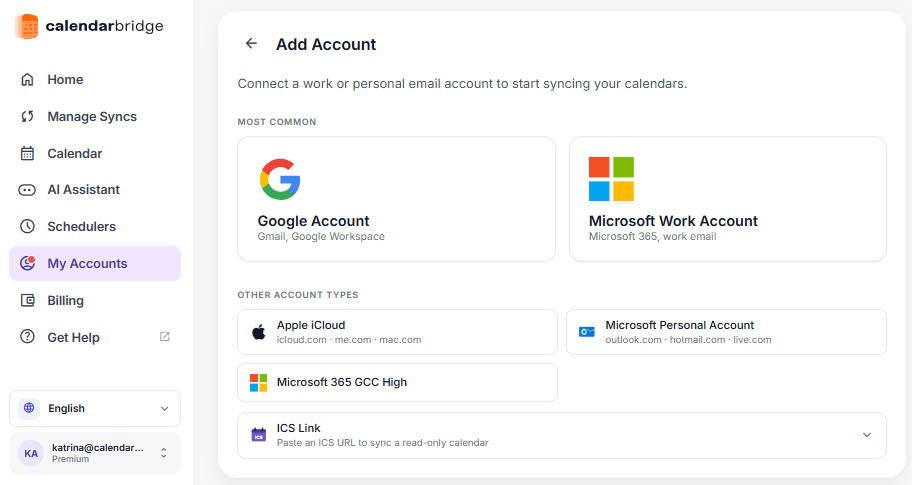
CalendarBridge is built for environments where calendar data cannot simply be copied, exposed, or freely shared across systems. It connects through official Microsoft and Google APIs using tightly scoped OAuth permissions, keeping each Microsoft 365 tenant fully separate and under its own security controls.
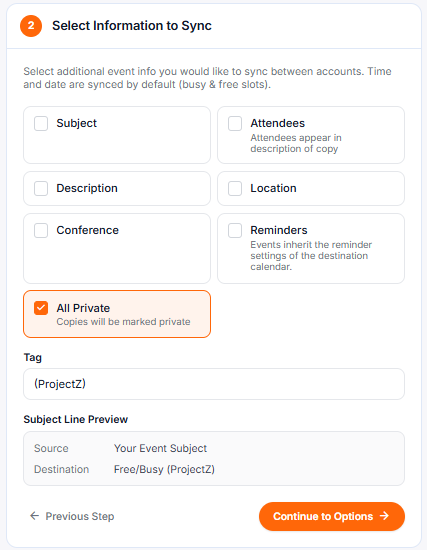
Users and organizations decide what is synchronized. In many GCC High and regulated setups, that means syncing availability only. Meeting titles, attendees, descriptions, locations, and other sensitive details can remain inside the original tenant. This allows teams to coordinate schedules without exposing sensitive information across systems.
For consultants, fractional leaders, and embedded teams working across Microsoft 365 GCC High and other commercial tenants, this approach matters during IT review. CalendarBridge does not rely on browser extensions, background scraping, or unrestricted calendar access. Access is limited, visible, and can be revoked instantly by administrators.
That combination of bounded permissions and tenant isolation is what allows CalendarBridge to be approved in environments that typically restrict third party tooling, while still solving the practical problem of keeping availability aligned across organizations. Learn more about privacy settings in our help center.
Secure Calendar Sync for Regulated Teams
Adding Microsoft 365 GCC High support isn’t just about another Microsoft configuration. It’s about supporting how regulated work actually happens, whether inside large organizations operating under strict compliance requirements or among independent consultants working directly inside customer-owned environments.
In both cases, the problem is the same: calendars live in separate systems that cannot be merged, but availability still needs to stay aligned across them.
When individuals and organizations no longer have to manually reconcile calendars across tenants, they spend less time managing scheduling conflicts and more time focused on the work those environments exist to support.
- Separate systems.
- Shared availability.
- Secure synchronization across Microsoft 365 GCC High.
No credit card required

Frequently Asked Questions
Yes. CalendarBridge supports Microsoft 365 GCC High, allowing teams in regulated Microsoft environments to securely synchronize calendar availability across supported systems.
GCC High calendar sync is useful for government contractors, defense-related organizations, regulated teams, embedded consultants, and professionals who work across multiple secure Microsoft 365 tenants.
Yes. CalendarBridge can be configured to sync availability while keeping sensitive meeting details, such as titles, attendees, descriptions, and locations, inside the original calendar environment.
GCC High environments often involve stricter security requirements, separate tenants, limited access between organizations, and sensitive meeting information that should not be copied freely across systems. That makes manual calendar coordination difficult and risky.
Availability-only sync helps teams coordinate schedules without exposing sensitive meeting information. This is important when calendar details need to remain inside the original tenant for privacy, compliance, or customer security reasons.
Final Thoughts
For teams working in Microsoft 365 GCC High, calendar sync is not just a convenience feature. It is an operational need that has to be handled carefully.
Separate tenants, customer-owned environments, and strict security requirements make traditional calendar workarounds difficult to manage. Manually blocking time across calendars may work for a short period, but it becomes unreliable as more agencies, contractors, consultants, and regulated teams are involved.
CalendarBridge helps solve that problem by securely syncing availability across supported environments while keeping each tenant separate and allowing sensitive meeting details to remain protected.
That means GCC High teams can spend less time reconciling calendars and more time focused on the work those secure environments exist to support.