Scheduling Pages for people with multiple calendars

Schedule Meetings with less back-and-forth while ensuring accurate availability across all your calendars.

CalendarBridge scheduling page
Trusted by Fortune 500 companies, teams, and thousands of individuals worldwide
FEATURES

Why CalendarBridge

All individual plans come with all these features.

Check availability across multiple calendars

Check up to 4 unsynced calendars and 10 or more calendars when combined with syncing.

Personalize the text of your link to make it unique and easy to remember.

Unlimited connected calendars

Create up to 10 scheduling links with each link booking to a different one of 10 calendars and checking availability across many calendars.

Per-page branding

Each of your 10 scheduling pages can have its own logo, avatar, and greeting message.

HOW IT WORKS

Simple Setup

Everything is done from our web portal. Nothing to install or configure on any of your devices.

Select calendars

STEP 1

Select a calendar to book meetings on, and up to 3 additional calendars to check availability on.

scheduling page setup step 1

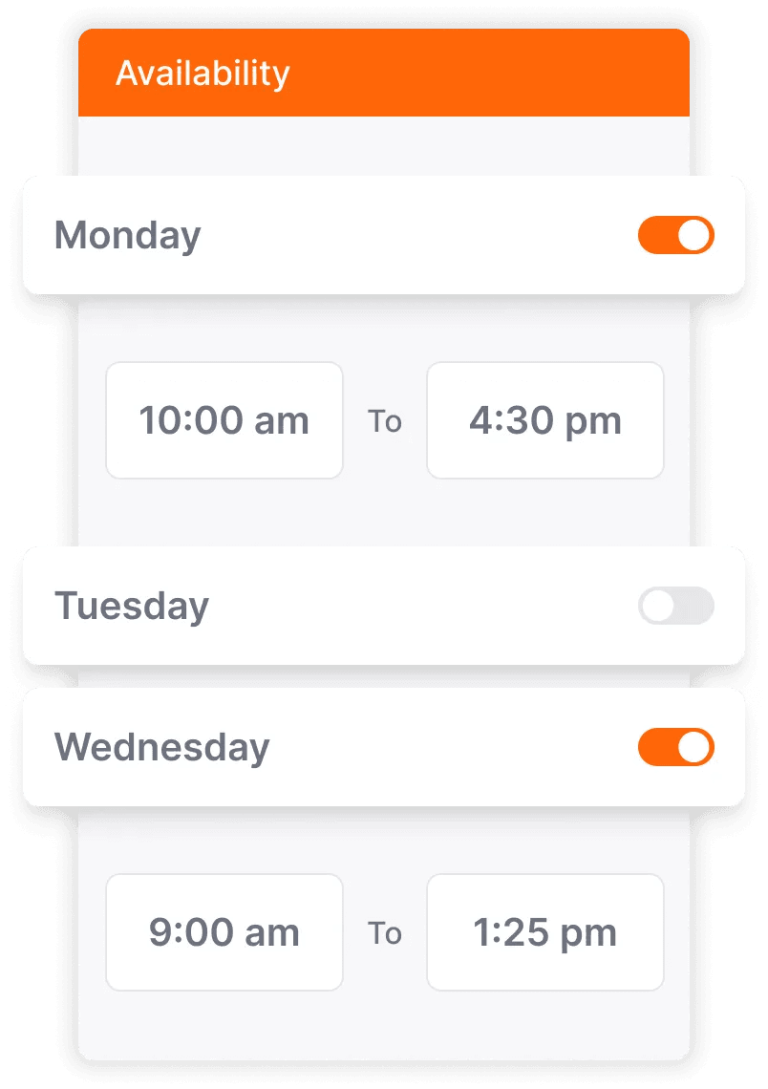
Set your availability

STEP 2

Set days and times allowed for booking, buffers between meetings, and minimum notice before a meeting.

scheduling page setup step 2

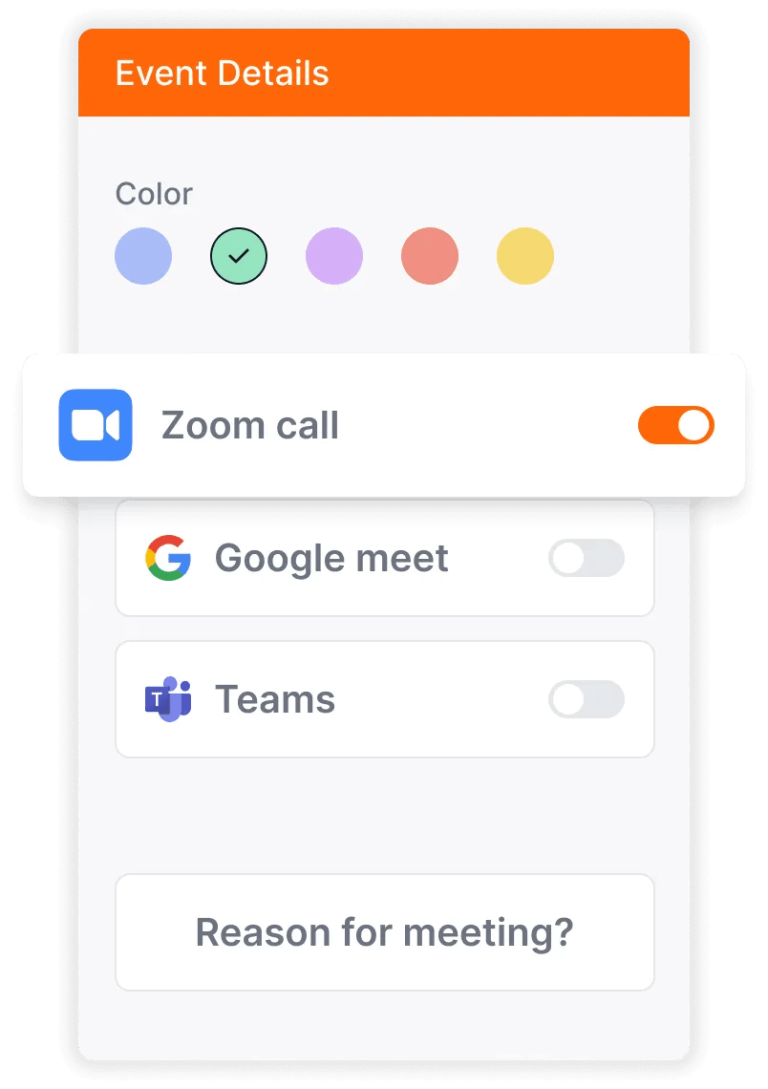
Add event details

STEP 3

Color-code your events, add Zoom/Teams/Meets links, and provide questions for invitees to answer.

scheduling page setup step 3

Frequently Asked Questions

Learn more about CalendarBridge Scheduling Pages and Booking Links, how they work and who they’re for.

Can’t find what you are looking for? Check out our help site.

Scheduling pages are personalized booking links you can share with others so they can book meetings with you during times you’ve set as available, while checking your real availability across multiple calendars so there is no back-and-forth scheduling.

This feature is ideal for people who manage multiple calendars (for example, personal, work, client, or side-project calendars) and want others to schedule time with them without conflicting bookings.

You can create up to 10 unique scheduling links. Each one can be tied to a specific primary calendar while still checking availability across multiple additional calendars.

Yes. Each scheduling page link can have its own logo, avatar, greeting message, and personalized link text, making it easy to brand for different audiences or use-cases.

When someone clicks your scheduling page link, CalendarBridge checks your availability across up to 4 calendars by default. If you also have calendar syncing set up, each scheduling page can pull availability from even more calendars to ensure accuracy.

No. Setting up and managing your scheduling pages is done completely through the CalendarBridge web portal without installing software on your devices.

Yes. You can define your available days and times, set minimum notice before bookings, and add buffer windows between meetings so your schedule stays orderly.

When guests pick a time, you can configure event details such as meeting title, time duration options, video conferencing links (like Zoom/Teams/Meet), and custom questions for the invitee to answer.

Scheduling pages are ideal for anyone who manages multiple calendars and schedules meetings regularly. This includes consultants, sales teams, recruiters, freelancers, executives, remote workers, and support teams who need an easy way to let others book time without conflicts, back-and-forth emails, or accidental double bookings.


Yes. We offer a free trial so you can explore Unified Calendar and see how it fits your workflow.

We Love Our Users and They Love Us

Consultants, fractional resources, busy professionals, and others with multiple calendars, love CalendarBridge.

Keep up the Great Work - My Experience has been Terrific

I was excited when you launched the AI Assistant. My experience so far has been terrific, testing it with colleagues and planning to use it with clients. It feels natural, follows up automatically, and understands changes. I have three Microsoft tenancies, plus Gmail and iCloud, and look forward to deploying an agent for each to manage all my calendars seamlessly.

Richard H.
Verified User

Great Calendar Sync Service

I’m running 2 companies and I have 3 calendar accounts, 1st is Gmail for private, 2nd is Office365 for business A, and 3rd is Office365 for business B. Before I met with this service, I always copied my schedule for all calendars and sometimes forgot to copied. This made me so uncomfortable and took time. With this service, I don’t need to worry about “copy” anymore.

Kenzo K.

No more double booking calendars!

I like how easy it was to setup the software, and that instantly both of my calendars are in synch. No more double booking events on two calendars!

Becky M.

Finally a sync software that is easy, inexpensive, and works!

Great software that is inexpensive, easy to setup and use, and works great!

Justin S.

Did exactly what I needed!

I was able to easily configure it so that the details of the client calendar show on my company calendar, but other appointments at my company only show as “busy” on the client calendar to protect my confidentiality. It also has an appointment scheduling feature similar to Calendly which is great as it saves me from having to use another tool. I’m super happy with it.

Jason K.

CalendarBridge for Conventional Planning

CalendarBridge has powerful processes, that allows every planning and orderliness successful.

Fillipo M.

We Are Trusted by Major Companies Across All Industries

For enterprise-grade security and account management tools, companies
turn to CalendarBridge. Learn more about us.

redfin logo

Privacy and Security
Come First

With CalendarBridge, you stay in full control of your calendar and personal data.

No Data Stored or Analyzed

CalendarBridge never stores, or analyzes, or sells any of your calendar data. Our goal is simplicity in calendaring, not prying into your data.

Secure Connections

CalendarBridge connects via the secure OAuth2 protocol. We have no access to your login credentials and you can revoke our access at any time.

Keep Your Accounts Separate

CalendarBridge allows you to control what events and details get synced. No need to worry about data spilling over from one account to another.

Minimum Access

CalendarBridge only requests the bare minimum calendar permissions. We do not have access to your email, files, or any other non-calendar features.

Reduce Stress

Stop the multi-calendar chaos

Spend less time managing your calendars and more time getting things done.